

Budgeting
Best Budgeting Apps for Retirees 2026/27: Top Picks

49% of retirees say expenses are higher than expected. 58% do not know how long their savings will last. Average retirement spending is $60,087 per year. And healthcare alone consumes 16 cents of every dollar of income. The right budgeting app will not solve every retirement financial challenge — but it can be the difference between spending in the dark and knowing exactly where every dollar goes. This guide reviews the seven best options for 2026/27, with pricing, features, and a verdict on who each one is right for.
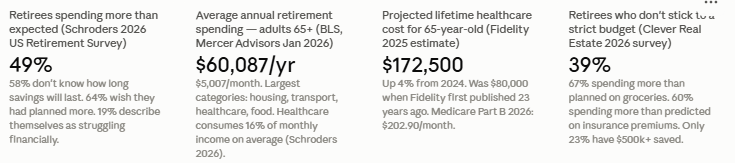
The Schroders 2026 US Retirement Survey of 1,500 retired Americans puts the financial picture in stark relief: 49% of retirees say their expenses in retirement are higher than expected. 58% do not know how long their retirement savings will last. 64% wish they had done more financial planning before retiring. These are not fringe outcomes — they are the majority experience of American retirees in 2026, even after a decade of growing awareness about retirement planning gaps.
The core budgeting challenge in retirement is that income is largely fixed but costs are not. The average retiree household spends $60,087 per year, or approximately $5,007 per month, according to BLS data cited in Mercer Advisors' January 2026 analysis. Healthcare alone consumes 16% of total monthly income on average, according to Schroders — more than $800 per month for the typical retiree. Medicare Part B premiums are $202.90 per month in 2026, and Fidelity's 2025 estimate projects $172,500 in total lifetime healthcare spending for a 65-year-old retiring today — up 4% from the previous year and more than double the estimate from ten years ago.
Groceries have risen more than 18% since 2022. Insurance premiums are up. The 2026 Social Security COLA of 2.8% — while welcome — is widely considered insufficient to cover actual senior cost increases, particularly in healthcare. Against this backdrop, a budgeting app for retirees needs to do more than track spending categories: it needs to connect multiple income sources (Social Security, pension, IRA withdrawals, dividends), handle irregular income like RMDs and tax refunds, track healthcare costs in detail, and help manage withdrawal strategy so savings last as long as needed.
49% of retirees say expenses are higher than expected (Schroders 2026 US Retirement Survey). 58% do not know how long their savings will last. 64% wish they had planned more. Average retirement spend: $60,087/year — $5,007/month (BLS, cited Mercer Advisors Jan 2026). Healthcare: 16% of monthly retirement income average (Schroders 2026). Fidelity 2025: $172,500 projected lifetime healthcare spending for a 65-year-old. Medicare Part B 2026: $202.90/month. SS COLA 2026: 2.8%. Average SS payment January 2025: $1,976/month. 39% of retirees say they do not stick to a strict budget (Clever Real Estate 2026).
For retirees, the retirement planner is the most relevant feature. It pulls from linked accounts to project income against anticipated retirement expenses, models different income sources and savings trajectories, and provides a forward-looking picture that goes beyond simple spending tracking. The net worth dashboard consolidates all linked accounts — bank, brokerage, IRA, 401(k), real estate — into a single view, which is particularly useful for retirees managing multiple account types as part of a coordinated withdrawal strategy.
The trade-off for the free tools is that Empower is also a wealth management firm. Users who link accounts will encounter prompts to explore Personal Strategy, Empower's paid managed investment service, which requires a $100,000 minimum and charges 0.89% annually. The free tools remain fully functional without engaging those services — but retirees who find the upsell prompts intrusive may prefer a paid app without a commercial agenda.
Empower: Best free budgeting app for retirees in 2026. Cost: $0 (free tools; no subscription). Best for: retirees who want a comprehensive retirement projection tool and investment tracker without paying a monthly fee. Platform: iOS, Android, web. Awards: NerdWallet 'Best for tracking wealth and spending' January 2026; Forbes Advisor 'Best for Tracking Net Worth' 2025. Watch out for: prompts to explore the paid managed service ($100k minimum, 0.89%/year). The free tools are genuinely complete — the upsell is avoidable. Source: Quicken.com June 2026; NerdWallet; Freedom Debt Relief August 2026.
Simplifi's retirement-relevant features include account syncing across bank, investment, and credit accounts; a spending plan that projects cash flow forward; bill tracking and reminders; and a 15-variable Advanced mode retirement planning calculator that models income sources, withdrawal rates, and projected account balances. The Quicken.com June 2026 analysis rates the combination of advanced retirement planning, live investment tracking, spending management, and savings goals in one app as the most complete single-platform option available at its price point.
Simplifi was built by Quicken, a personal finance software brand with more than three decades of history — a pedigree that matters to retirees who remember using Quicken desktop software in earlier years. The app is the modern, cloud-based evolution of that platform, with a significantly cleaner interface than the original Quicken software.
Quicken Simplifi: Best paid budgeting app for clean everyday retirement budget management. Cost: ~$3.99/month (promotional) or ~$47.88-$71.88/year. Best for: retirees who want a fast, clean spending tracker with forward cash flow projections and don't need deep retirement income modelling. CNBC Select: 'Best App for Planners' 2024, 2025, 2026. Platform: iOS, Android, web. The most affordable premium option in the market in 2026. Verify current pricing at quicken.com before subscribing. Source: Quicken.com June 2026; CNBC Select April 2026; Finny April 2026.
For retirees with complex Social Security decisions ahead — the choice of when to claim, how to coordinate spousal benefits, how to sequence withdrawals from taxable, tax-deferred, and Roth accounts — Boldin's PlannerPlus tier offers a level of analytical depth that no general budgeting app approaches. CNBC Select named Boldin one of the 'Best Retirement Planning Tools of 2026' and NerdWallet includes it in its top retirement tools listing. Freedom Debt Relief's August 2026 guide specifically recommends Boldin for users who want 'deeper features including tax planning, withdrawal strategies across account types, and Medicare cost estimates.'
The trade-off is that Boldin is primarily a planning and projection tool, not an everyday budgeting tracker. It does not offer the granular daily transaction categorisation that Simplifi or Monarch Money provide. Retirees who want both detailed daily spending tracking and sophisticated retirement income projection may need to use two apps — Boldin for planning and Empower or Simplifi for day-to-day budgeting.
Boldin (NewRetirement): Best retirement income planning and projection tool. Cost: Free basic tier; PlannerPlus paid (annual subscription — verify current price at boldin.com). Best for: retirees with complex Social Security decisions, multiple account types, Roth conversion questions, and Medicare planning needs. Not ideal as a standalone daily spending tracker. Platform: web-based; works on mobile browsers; no dedicated iOS/Android app. Awards: CNBC Select 'Best Retirement Planning Tools of 2026'; NerdWallet top retirement tool. Source: CNBC Select August 2026; Freedom Debt Relief August 2026; Quicken.com June 2026.
At $14.99 per month or $109 per year, YNAB is the most expensive app on this list by annual subscription. The learning curve is real — CNBC Select and NerdWallet both note that YNAB requires a genuine weekly review commitment to work as designed. But for retirees who are overspending their budget, struggling to control discretionary categories like dining and travel, or who need the psychological accountability of a system that requires active engagement, YNAB produces documented behaviour change that passive tracking apps do not.
For retirees on a tight fixed income — particularly those in the 19% who describe themselves as 'struggling' financially in the Schroders 2026 survey — YNAB's structured approach to making income cover expenses can be more immediately useful than the projection features of a planning tool. The Ramsey Solutions April 2026 comparison notes that YNAB and EveryDollar both use zero-based budgeting, but YNAB rolls unused budget amounts forward while EveryDollar pushes them toward goals.
YNAB: Best for retirees who are overspending or need structured behaviour change. Cost: $14.99/month or $109/year (no free tier; 34-day free trial). Best for: retirees who have tried passive tracking apps and found they did not change spending habits; those who need strict category discipline; strong mobile experience for iOS and Android. Watch out for: genuine learning curve and weekly review requirement. Not the right fit if you simply want passive spending tracking. Source: CNBC Select April 2026; WalletGrower August 2026; NerdWallet September 2026.
At $14.99 per month or $99.99 per year for the Core plan, Monarch is priced just below YNAB and just above Simplifi. The feature set includes account syncing across bank, credit, loan, and investment accounts; flexible budgeting (a high-level view grouping spending into fixed, non-monthly recurring, and flexible categories) or category budgeting with specific spending limits; a net worth tracker; an investment dashboard; and bill reminders. The WalletGrower August 2026 review rates Monarch as 'a serious budgeting and net-worth dashboard' that occupies 'a distinct middle ground: more powerful than simple trackers like Rocket Money, but less philosophically rigid than YNAB.'
The caution for solo retirees is explicitly flagged in multiple 2026 reviews: $99.99 per year for a single-person household is steep when Quicken Simplifi covers most of the same daily spending value at approximately half the price. The Envelope Budgeting June 2026 review states: 'Monarch's biggest differentiator is household sharing — if you live alone, you may be paying for features you do not use.'
Monarch Money: Best for retired couples managing joint finances. Cost: $14.99/month or $99.99/year Core; $199/year Plus. Best for: couples who want a shared financial dashboard, combined transaction visibility, and joint savings goals. Caution for solo users: Quicken Simplifi at half the price covers most of the same daily spending features. Platform: iOS, Android, web. Bank connections via Plaid, Mastercard Data Connect, or MX. Source: WalletGrower August 2026; Envelope Budgeting June 2026; Finny April 2026.
The zero-based approach works well for retirees on Social Security and pension income because the income is predictable: the same amounts arrive on the same dates each month, making it straightforward to plan the full monthly budget in advance. Discretionary categories like travel, dining, and gifts can be allocated what is left after fixed expenses, healthcare, and savings goals are covered. Any leftover at month-end is pushed toward the next goal rather than silently accumulated.
EveryDollar costs $17.99 per month or $79.99 per year after the two-week free trial, positioning it slightly below Monarch Money and just above YNAB on an annual basis. The Ramsey Solutions April 2026 comparison notes that EveryDollar is simpler and less feature-dense than YNAB, which makes it the better entry point for retirees who are new to app-based budgeting and want zero-based structure without YNAB's learning curve.
EveryDollar: Best zero-based budgeting app for retirees who are new to app-based budgeting. Cost: $17.99/month or $79.99/year (2-week free trial). Best for: retirees on predictable fixed income who want structured zero-based budgeting with a simpler interface than YNAB. User-friendly interface specifically noted by SeniorLiving.org for older adults. Categories are fully customisable. Platform: iOS, Android, web. Source: SeniorLiving.org October 2025; Ramsey Solutions April 2026.
The basic tier is free and includes spending tracking, subscription identification, and net worth monitoring. The Premium tier at $7 to $14 per month adds bill negotiation (Rocket Money contacts providers on the user's behalf to negotiate lower rates), cancellation assistance, custom spending categories, and priority customer support. The Premium pricing is variable and set by the user within a range — an unusual model that lets users determine what they feel the service is worth.
For retirees whose primary goal is to find and eliminate unnecessary recurring costs rather than to build a comprehensive retirement budget, Rocket Money provides a focused, low-effort solution. It does not offer retirement income projection, RMD tracking, or Social Security modelling — so it is best used alongside a more comprehensive tool (Empower or Boldin) rather than as a standalone retirement budgeting solution.
Rocket Money: Best for immediately cutting unnecessary subscriptions and reducing bills. Cost: Free basic tier; $7-$14/month Premium (user-set within range). Best for: retirees who want a quick subscription audit and automated bill negotiation rather than a comprehensive budget tracker. Pair with Empower (free) for a no-cost combination that covers both subscription elimination and retirement projection. Platform: iOS, Android, web. Awards: top subscription monitoring app per SavingAdvice.com June 2026. Source: WalletGrower August 2026; Wall Street Survivor July 2026; SavingAdvice.com June 2026.
Prices verified from published sources as of August 2026 (WalletGrower August 2026; CNBC Select April 2026; Quicken sources; Finny April 2026; Ramsey Solutions April 2026; Wall Street Survivor July 2026). Annual prices may reflect promotional rates. Always verify current pricing at each app's official website before subscribing. Not financial advice.
Average annual spending: adults 65 and over spend $60,087/year ($5,007/month) on average, according to Bureau of Labor Statistics data cited by Mercer Advisors in January 2026. The largest spending categories are housing, transportation, healthcare, and food. Healthcare alone averages 16% of total monthly income (Schroders 2026) — approximately $801/month on $60,087/year. Medicare Part B: $202.90/month ($2,434.80/year) in 2026. Food: 67% of retirees say they are spending more than planned on groceries (Clever Real Estate 2026). Insurance premiums: 60% of retirees say they spent more than predicted (Clever Real Estate 2026). 39% of retirees say they do not stick to a strict budget. $823,000: what retirees say is needed to retire comfortably — but only 23% have $500,000 or more saved.
The four areas where retirees most consistently overspend relative to their pre-retirement plans are groceries (67% of retirees spending more than expected), insurance premiums (60%), healthcare broadly, and what the Schroders survey describes simply as 'unexpected expenses' — the category that every retired person knows exists but that almost no pre-retirement budget adequately captures. A budgeting app that tracks these categories in real time — connecting to every account that generates transactions in these areas — provides the visibility that prevents chronic overspending from quietly depleting savings.
The 60% of US adults paying for at least one subscription they no longer actively use (SavingAdvice.com June 2026) is a specific, findable, and fixable cost category for retirees. Streaming services, premium app subscriptions, fitness memberships, and annual renewals that no longer reflect current usage are common in households that signed up for services over many years. For retirees who use Rocket Money to identify and cancel even two unused $15/month subscriptions, the app pays for itself within the first month at the free tier.
The best free option in 2026 is Empower: a genuine retirement planning toolkit at zero cost, with no meaningful features locked behind a paywall. The best paid option for everyday spending clarity is Quicken Simplifi, which has earned three consecutive CNBC Select 'Best for Planners' awards and comes in at the lowest annual price of any premium app on this list. The best option for retirees with complex Social Security and withdrawal decisions is Boldin, which offers analytical depth that no general budgeting app matches. The best option for couples is Monarch Money; for strict zero-based budgeters, YNAB or EveryDollar; for subscription elimination as a first step, Rocket Money's free tier.
The 39% of retirees who say they do not stick to a strict budget are not fundamentally different from those who do. They simply have not yet found the system that makes staying within a budget feel natural rather than like work. One of the seven apps in this guide is designed for exactly their situation — the task is simply finding out which one it is, using the free trials every app provides before spending a penny.
Empower Personal Dashboard is the best free budgeting app for retirees in 2026. The free tools include a full retirement planner (which projects how long your savings will last based on linked accounts), a net worth dashboard that consolidates all accounts, a cash flow and budgeting tool, a savings planner, and a fee analyser that identifies excessive investment management charges. NerdWallet named Empower the 'Best budget app for tracking wealth and spending' in January 2026. The free tools are fully functional and complete — there is no meaningful feature locked behind a paywall, though the company offers a paid managed investment service and will prompt users to consider it. The free tools can be used indefinitely without engaging any paid service. Start at empower.com or download the app from the App Store or Google Play.
Do retirees really need a separate budgeting app from their bank?
Yes — for most retirees, a dedicated budgeting app provides capabilities that bank portals do not. Banks typically show transaction history and account balances for their own accounts only. A budgeting app connects multiple banks, investment accounts, brokerage accounts, and credit cards into a single dashboard, automatically categorises all transactions, and — for retirement-specific tools like Boldin and Empower — projects future account balances and models the sustainability of current withdrawal rates. 58% of retirees do not know how long their retirement savings will last (Schroders 2026). A bank portal will not answer that question. A retirement planning app like Boldin or Empower's retirement planner will. For retirees with multiple income sources (Social Security, pension, IRA withdrawals, dividends) and multiple account types, the consolidated visibility a budgeting app provides is substantively different from what any single bank portal offers.
Is YNAB worth it for retirees?
YNAB is worth it for a specific type of retiree: one who is overspending their monthly budget, has tried passive tracking apps without changing their habits, and is willing to invest the time required to build the zero-based budgeting habit YNAB requires. At $109 per year ($14.99/month), YNAB is the most expensive subscription app on this list. It has no free tier, only a 34-day free trial. The learning curve is real, and it requires a genuine weekly review commitment to work as designed. For retirees who are within budget and primarily want to track spending and model retirement projections, the free Empower tools or the lower-cost Quicken Simplifi ($47-72/year) are better fits. But for retirees who need actual behaviour change — who consistently find themselves at the end of the month having overspent dining, travel, or discretionary categories — YNAB's structured approach produces results that passive trackers do not. The 34-day trial is long enough to evaluate whether the system works.
Can budgeting apps track Social Security and RMDs?
Yes — the apps on this list can track Social Security deposits and Required Minimum Distributions, though the depth of tracking varies. At the basic level, every app with account syncing (Empower, Simplifi, Monarch Money, YNAB, Boldin PlannerPlus) will automatically detect and categorise Social Security deposits when they hit a linked bank account. You can label them as 'Social Security income' or create a dedicated income category for them. For RMDs: apps that sync investment accounts (Empower, Monarch Money, Simplifi) can detect when a withdrawal is made from a traditional IRA or 401(k). Boldin goes further and actively models RMDs in its retirement projection — incorporating the IRS's required minimum distribution schedule into projections of future account balances and tax liability. If RMD planning is a central concern, Boldin's PlannerPlus is the most analytically complete option for modelling the impact of different withdrawal strategies across account types.
What is the best budgeting app for tracking healthcare costs in retirement?
Empower and Quicken Simplifi both support healthcare expense tracking through account syncing and customisable expense categories. You can create specific categories for Medicare Part B premiums, Medigap premiums, prescription costs, and out-of-pocket medical spending — providing the granular visibility that is important given healthcare's 16% average share of retirement income (Schroders 2026). Boldin's PlannerPlus tier includes dedicated Medicare cost planning as part of its retirement projection framework — making it particularly useful for modelling how Medicare premium increases (projected to rise more than 11% for Part B in 2026, per a Motley Fool analysis cited on Nasdaq) will affect long-term retirement income. For everyday healthcare expense tracking, Empower (free) or Simplifi (~$3.99/month) are the most practical options. For forward-looking Medicare cost modelling as part of a retirement plan, Boldin PlannerPlus is the specialist tool.
Table of Contents
- Why Retirees Need a Different Kind of Budgeting App
- The Seven Features That Matter Most on a Fixed Income
- App #1 — Empower Personal Dashboard (Best Free Option)
- App #2 — Quicken Simplifi (Best for Clean Everyday Budgeting)
- App #3 — Boldin / NewRetirement (Best for Retirement Income Planning)
- App #4 — YNAB (Best for Behaviour Change and Overspending)
- App #5 — Monarch Money (Best for Couples and Households)
- App #6 — EveryDollar (Best for Zero-Based Simplicity)
- App #7 — Rocket Money (Best for Cutting Subscriptions and Bills)
- Side-by-Side Comparison: All Seven Apps at a Glance
- The Retirement Spending Reality: What the Data Says
- How to Choose the Right App for Your Situation
- Conclusion: The Best App Is the One You Will Actually Use
- Frequently Asked Questions
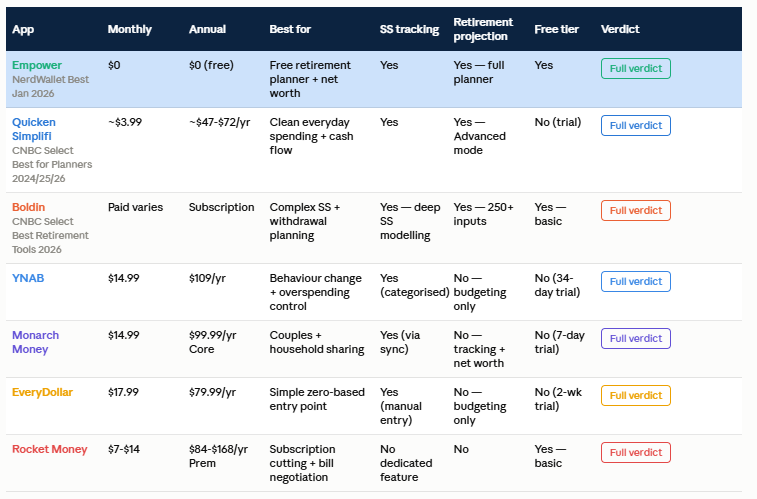
App comparison: features, cost and verdict
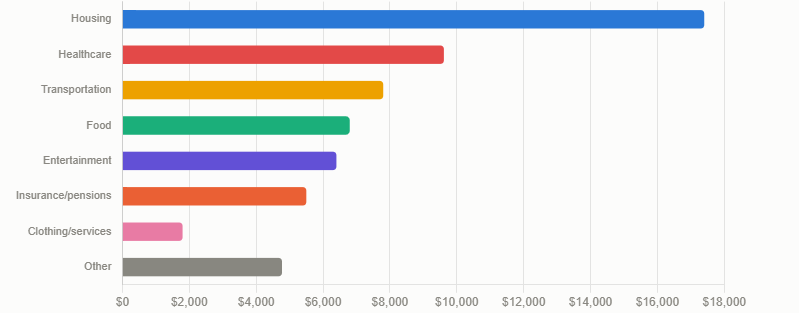
Where retirees actually spend: the $60k breakdown
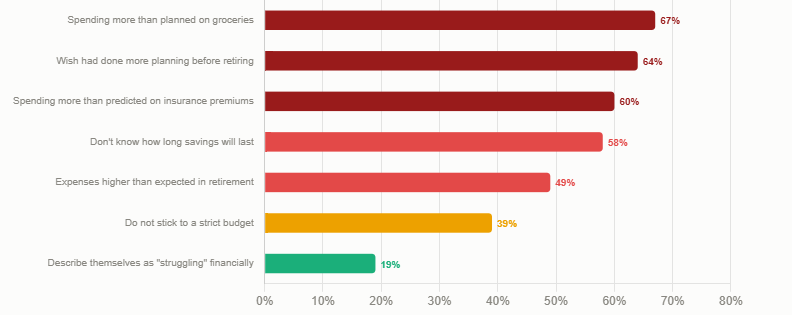
Retirement financial stress: what the 2026 data shows
Why Retirees Need a Different Kind of Budgeting App
Budgeting in retirement is fundamentally different from budgeting during working years — and most budgeting apps were designed for people with a regular paycheck, not for people managing multiple fixed income streams, Required Minimum Distributions, Medicare premiums, and the constant threat of healthcare costs that exceed projections.The Schroders 2026 US Retirement Survey of 1,500 retired Americans puts the financial picture in stark relief: 49% of retirees say their expenses in retirement are higher than expected. 58% do not know how long their retirement savings will last. 64% wish they had done more financial planning before retiring. These are not fringe outcomes — they are the majority experience of American retirees in 2026, even after a decade of growing awareness about retirement planning gaps.
The core budgeting challenge in retirement is that income is largely fixed but costs are not. The average retiree household spends $60,087 per year, or approximately $5,007 per month, according to BLS data cited in Mercer Advisors' January 2026 analysis. Healthcare alone consumes 16% of total monthly income on average, according to Schroders — more than $800 per month for the typical retiree. Medicare Part B premiums are $202.90 per month in 2026, and Fidelity's 2025 estimate projects $172,500 in total lifetime healthcare spending for a 65-year-old retiring today — up 4% from the previous year and more than double the estimate from ten years ago.
Groceries have risen more than 18% since 2022. Insurance premiums are up. The 2026 Social Security COLA of 2.8% — while welcome — is widely considered insufficient to cover actual senior cost increases, particularly in healthcare. Against this backdrop, a budgeting app for retirees needs to do more than track spending categories: it needs to connect multiple income sources (Social Security, pension, IRA withdrawals, dividends), handle irregular income like RMDs and tax refunds, track healthcare costs in detail, and help manage withdrawal strategy so savings last as long as needed.
49% of retirees say expenses are higher than expected (Schroders 2026 US Retirement Survey). 58% do not know how long their savings will last. 64% wish they had planned more. Average retirement spend: $60,087/year — $5,007/month (BLS, cited Mercer Advisors Jan 2026). Healthcare: 16% of monthly retirement income average (Schroders 2026). Fidelity 2025: $172,500 projected lifetime healthcare spending for a 65-year-old. Medicare Part B 2026: $202.90/month. SS COLA 2026: 2.8%. Average SS payment January 2025: $1,976/month. 39% of retirees say they do not stick to a strict budget (Clever Real Estate 2026).
The Seven Features That Matter Most on a Fixed Income
Before comparing specific apps, it is worth establishing the feature criteria that distinguish a good retiree budgeting app from a good general budgeting app. SavingAdvice.com's June 2026 guide to the seven features that matter on a fixed income provides a useful framework, supplemented by the specific retirement income challenges identified in the Schroders 2026 and Fidelity 2025 data.- Multi-source income tracking: the ability to connect and categorise Social Security deposits, pension payments, IRA withdrawals, RMDs, annuity income, dividend income, and rental income as separate identified streams — not just as undifferentiated 'income.' Retirees typically have three to five income sources; an app that bundles them into one figure is not useful for retirement cash flow management.
- Healthcare expense categorisation: dedicated categories (or the ability to create them) for Medicare Part B and D premiums, Medigap or Medicare Advantage premiums, prescription costs, dental and vision, and out-of-pocket medical spending. With healthcare at 16% of retirement income on average, granular tracking here is more valuable than granular tracking of any other category.
- Bill monitoring and payment reminders: retirees managing multiple healthcare and insurance payments monthly benefit specifically from automatic alerts before bills are due and notifications of unusual charges. Missing a Medicare premium payment or an insurance renewal carries real financial consequences.
- Account syncing and automatic categorisation: connecting bank accounts, investment accounts, credit cards, and brokerage accounts in real time, with automatic transaction categorisation. This reduces the manual data entry burden that leads many retirees to abandon apps after a few weeks, according to SavingAdvice.com June 2026.
- Retirement income projection and longevity planning: the ability to model how long savings will last given current spending, project the impact of spending changes, and visualise withdrawal rate sustainability. With 58% of retirees not knowing how long their savings will last (Schroders 2026), this feature addresses the single most common retirement financial anxiety.
- Security and privacy: all apps on this list use bank-level encryption and two-factor authentication. Apps that connect through Plaid, Finicity, or MX use read-only connections — they cannot move money, only view data. Retirees concerned about security should verify each app's specific connection methodology before linking accounts.
- Ease of use and accessibility: large fonts, intuitive dashboards, simple reports, and minimal setup friction. SavingAdvice.com's June 2026 guide makes a specific point about retiree app selection: ease of use typically matters more than advanced features that are rarely used. If an app feels confusing after a week, it is probably not the right fit regardless of its feature depth.
App #1 — Empower Personal Dashboard (Best Free Option)
Empower is the standout recommendation for retirees who want a comprehensive free tool. The Personal Dashboard — completely free, with no subscription required — includes a retirement planner, portfolio analysis, net worth tracking, budgeting and cash flow tools, a savings planner, and a fee analyser that flags excessive investment management fees. NerdWallet named Empower the 'Best budget app for tracking wealth and spending' in January 2026, and Forbes Advisor recognised it as the 'Best Budgeting App for Tracking Net Worth' in 2025.For retirees, the retirement planner is the most relevant feature. It pulls from linked accounts to project income against anticipated retirement expenses, models different income sources and savings trajectories, and provides a forward-looking picture that goes beyond simple spending tracking. The net worth dashboard consolidates all linked accounts — bank, brokerage, IRA, 401(k), real estate — into a single view, which is particularly useful for retirees managing multiple account types as part of a coordinated withdrawal strategy.
The trade-off for the free tools is that Empower is also a wealth management firm. Users who link accounts will encounter prompts to explore Personal Strategy, Empower's paid managed investment service, which requires a $100,000 minimum and charges 0.89% annually. The free tools remain fully functional without engaging those services — but retirees who find the upsell prompts intrusive may prefer a paid app without a commercial agenda.
Empower: Best free budgeting app for retirees in 2026. Cost: $0 (free tools; no subscription). Best for: retirees who want a comprehensive retirement projection tool and investment tracker without paying a monthly fee. Platform: iOS, Android, web. Awards: NerdWallet 'Best for tracking wealth and spending' January 2026; Forbes Advisor 'Best for Tracking Net Worth' 2025. Watch out for: prompts to explore the paid managed service ($100k minimum, 0.89%/year). The free tools are genuinely complete — the upsell is avoidable. Source: Quicken.com June 2026; NerdWallet; Freedom Debt Relief August 2026.
App #2 — Quicken Simplifi (Best for Clean Everyday Budgeting)
Quicken Simplifi has won CNBC Select's 'Best App for Planners' award three years running — 2024, 2025, and 2026. Its core strength is a clean, fast interface focused on spending plans and projected cash flow. At approximately $3.99 per month on the annual plan (roughly $47.88 to $71.88 per year depending on current promotions), it is the most affordable premium budgeting app on this list, making it the best value-for-money option among paid apps.Simplifi's retirement-relevant features include account syncing across bank, investment, and credit accounts; a spending plan that projects cash flow forward; bill tracking and reminders; and a 15-variable Advanced mode retirement planning calculator that models income sources, withdrawal rates, and projected account balances. The Quicken.com June 2026 analysis rates the combination of advanced retirement planning, live investment tracking, spending management, and savings goals in one app as the most complete single-platform option available at its price point.
Simplifi was built by Quicken, a personal finance software brand with more than three decades of history — a pedigree that matters to retirees who remember using Quicken desktop software in earlier years. The app is the modern, cloud-based evolution of that platform, with a significantly cleaner interface than the original Quicken software.
Quicken Simplifi: Best paid budgeting app for clean everyday retirement budget management. Cost: ~$3.99/month (promotional) or ~$47.88-$71.88/year. Best for: retirees who want a fast, clean spending tracker with forward cash flow projections and don't need deep retirement income modelling. CNBC Select: 'Best App for Planners' 2024, 2025, 2026. Platform: iOS, Android, web. The most affordable premium option in the market in 2026. Verify current pricing at quicken.com before subscribing. Source: Quicken.com June 2026; CNBC Select April 2026; Finny April 2026.
App #3 — Boldin / NewRetirement (Best for Retirement Income Planning)
Boldin — formerly known as NewRetirement and recently rebranded — is the only app on this list that was built specifically as a retirement planning tool rather than adapted from a general budgeting app. The distinction matters: Boldin's free version lets users build a basic retirement plan, estimate future income needs, and explore Social Security claiming options. The paid PlannerPlus tier adds real-time account linking, state and federal tax projections, Roth conversion modelling, Medicare planning, and access to more than 250 customisable inputs.For retirees with complex Social Security decisions ahead — the choice of when to claim, how to coordinate spousal benefits, how to sequence withdrawals from taxable, tax-deferred, and Roth accounts — Boldin's PlannerPlus tier offers a level of analytical depth that no general budgeting app approaches. CNBC Select named Boldin one of the 'Best Retirement Planning Tools of 2026' and NerdWallet includes it in its top retirement tools listing. Freedom Debt Relief's August 2026 guide specifically recommends Boldin for users who want 'deeper features including tax planning, withdrawal strategies across account types, and Medicare cost estimates.'
The trade-off is that Boldin is primarily a planning and projection tool, not an everyday budgeting tracker. It does not offer the granular daily transaction categorisation that Simplifi or Monarch Money provide. Retirees who want both detailed daily spending tracking and sophisticated retirement income projection may need to use two apps — Boldin for planning and Empower or Simplifi for day-to-day budgeting.
Boldin (NewRetirement): Best retirement income planning and projection tool. Cost: Free basic tier; PlannerPlus paid (annual subscription — verify current price at boldin.com). Best for: retirees with complex Social Security decisions, multiple account types, Roth conversion questions, and Medicare planning needs. Not ideal as a standalone daily spending tracker. Platform: web-based; works on mobile browsers; no dedicated iOS/Android app. Awards: CNBC Select 'Best Retirement Planning Tools of 2026'; NerdWallet top retirement tool. Source: CNBC Select August 2026; Freedom Debt Relief August 2026; Quicken.com June 2026.
App #4 — YNAB (Best for Behaviour Change and Overspending)
YNAB — You Need a Budget — is the most behaviourally demanding budgeting app on this list, and for the right retiree, it is the most transformative. YNAB's zero-based budgeting philosophy requires users to give every dollar a specific job at the start of each month: every dollar of income is assigned to a spending category, a savings goal, or a debt payment before it is spent. No dollar sits in a 'buffer' — every dollar has a designated purpose.At $14.99 per month or $109 per year, YNAB is the most expensive app on this list by annual subscription. The learning curve is real — CNBC Select and NerdWallet both note that YNAB requires a genuine weekly review commitment to work as designed. But for retirees who are overspending their budget, struggling to control discretionary categories like dining and travel, or who need the psychological accountability of a system that requires active engagement, YNAB produces documented behaviour change that passive tracking apps do not.
For retirees on a tight fixed income — particularly those in the 19% who describe themselves as 'struggling' financially in the Schroders 2026 survey — YNAB's structured approach to making income cover expenses can be more immediately useful than the projection features of a planning tool. The Ramsey Solutions April 2026 comparison notes that YNAB and EveryDollar both use zero-based budgeting, but YNAB rolls unused budget amounts forward while EveryDollar pushes them toward goals.
YNAB: Best for retirees who are overspending or need structured behaviour change. Cost: $14.99/month or $109/year (no free tier; 34-day free trial). Best for: retirees who have tried passive tracking apps and found they did not change spending habits; those who need strict category discipline; strong mobile experience for iOS and Android. Watch out for: genuine learning curve and weekly review requirement. Not the right fit if you simply want passive spending tracking. Source: CNBC Select April 2026; WalletGrower August 2026; NerdWallet September 2026.
App #5 — Monarch Money (Best for Couples and Households)
Monarch Money's biggest differentiator from every other app on this list is household sharing: multiple users can access the same account at no extra charge, see the same financial picture, tag shared transactions, and set shared savings goals. For retired couples managing joint finances — which represents a significant proportion of the retiree market — this is a genuinely useful feature that Simplifi, YNAB, and Empower do not match.At $14.99 per month or $99.99 per year for the Core plan, Monarch is priced just below YNAB and just above Simplifi. The feature set includes account syncing across bank, credit, loan, and investment accounts; flexible budgeting (a high-level view grouping spending into fixed, non-monthly recurring, and flexible categories) or category budgeting with specific spending limits; a net worth tracker; an investment dashboard; and bill reminders. The WalletGrower August 2026 review rates Monarch as 'a serious budgeting and net-worth dashboard' that occupies 'a distinct middle ground: more powerful than simple trackers like Rocket Money, but less philosophically rigid than YNAB.'
The caution for solo retirees is explicitly flagged in multiple 2026 reviews: $99.99 per year for a single-person household is steep when Quicken Simplifi covers most of the same daily spending value at approximately half the price. The Envelope Budgeting June 2026 review states: 'Monarch's biggest differentiator is household sharing — if you live alone, you may be paying for features you do not use.'
Monarch Money: Best for retired couples managing joint finances. Cost: $14.99/month or $99.99/year Core; $199/year Plus. Best for: couples who want a shared financial dashboard, combined transaction visibility, and joint savings goals. Caution for solo users: Quicken Simplifi at half the price covers most of the same daily spending features. Platform: iOS, Android, web. Bank connections via Plaid, Mastercard Data Connect, or MX. Source: WalletGrower August 2026; Envelope Budgeting June 2026; Finny April 2026.
App #6 — EveryDollar (Best for Zero-Based Simplicity)
EveryDollar, founded by personal finance author Dave Ramsey, applies the same zero-based budgeting principle as YNAB — every dollar of income is assigned a purpose before the month begins — but with a simpler, more accessible interface that SeniorLiving.org's October 2025 guide specifically rates as 'very user-friendly' and 'geared toward retirees, making it an excellent choice for older adults.'The zero-based approach works well for retirees on Social Security and pension income because the income is predictable: the same amounts arrive on the same dates each month, making it straightforward to plan the full monthly budget in advance. Discretionary categories like travel, dining, and gifts can be allocated what is left after fixed expenses, healthcare, and savings goals are covered. Any leftover at month-end is pushed toward the next goal rather than silently accumulated.
EveryDollar costs $17.99 per month or $79.99 per year after the two-week free trial, positioning it slightly below Monarch Money and just above YNAB on an annual basis. The Ramsey Solutions April 2026 comparison notes that EveryDollar is simpler and less feature-dense than YNAB, which makes it the better entry point for retirees who are new to app-based budgeting and want zero-based structure without YNAB's learning curve.
EveryDollar: Best zero-based budgeting app for retirees who are new to app-based budgeting. Cost: $17.99/month or $79.99/year (2-week free trial). Best for: retirees on predictable fixed income who want structured zero-based budgeting with a simpler interface than YNAB. User-friendly interface specifically noted by SeniorLiving.org for older adults. Categories are fully customisable. Platform: iOS, Android, web. Source: SeniorLiving.org October 2025; Ramsey Solutions April 2026.
App #7 — Rocket Money (Best for Cutting Subscriptions and Bills)
Rocket Money occupies a different niche from the other apps on this list: its primary strength is subscription tracking and bill negotiation, not retirement income planning or behavioural budgeting. SavingAdvice.com's June 2026 guide notes that approximately 60% of US adults pay for at least one subscription they do not actively use — streaming services, premium news subscriptions, fitness memberships, and software renewals that accumulate quietly over time. For retirees who have not audited their subscriptions recently, Rocket Money's automatic subscription detection can produce immediate savings with minimal effort.The basic tier is free and includes spending tracking, subscription identification, and net worth monitoring. The Premium tier at $7 to $14 per month adds bill negotiation (Rocket Money contacts providers on the user's behalf to negotiate lower rates), cancellation assistance, custom spending categories, and priority customer support. The Premium pricing is variable and set by the user within a range — an unusual model that lets users determine what they feel the service is worth.
For retirees whose primary goal is to find and eliminate unnecessary recurring costs rather than to build a comprehensive retirement budget, Rocket Money provides a focused, low-effort solution. It does not offer retirement income projection, RMD tracking, or Social Security modelling — so it is best used alongside a more comprehensive tool (Empower or Boldin) rather than as a standalone retirement budgeting solution.
Rocket Money: Best for immediately cutting unnecessary subscriptions and reducing bills. Cost: Free basic tier; $7-$14/month Premium (user-set within range). Best for: retirees who want a quick subscription audit and automated bill negotiation rather than a comprehensive budget tracker. Pair with Empower (free) for a no-cost combination that covers both subscription elimination and retirement projection. Platform: iOS, Android, web. Awards: top subscription monitoring app per SavingAdvice.com June 2026. Source: WalletGrower August 2026; Wall Street Survivor July 2026; SavingAdvice.com June 2026.
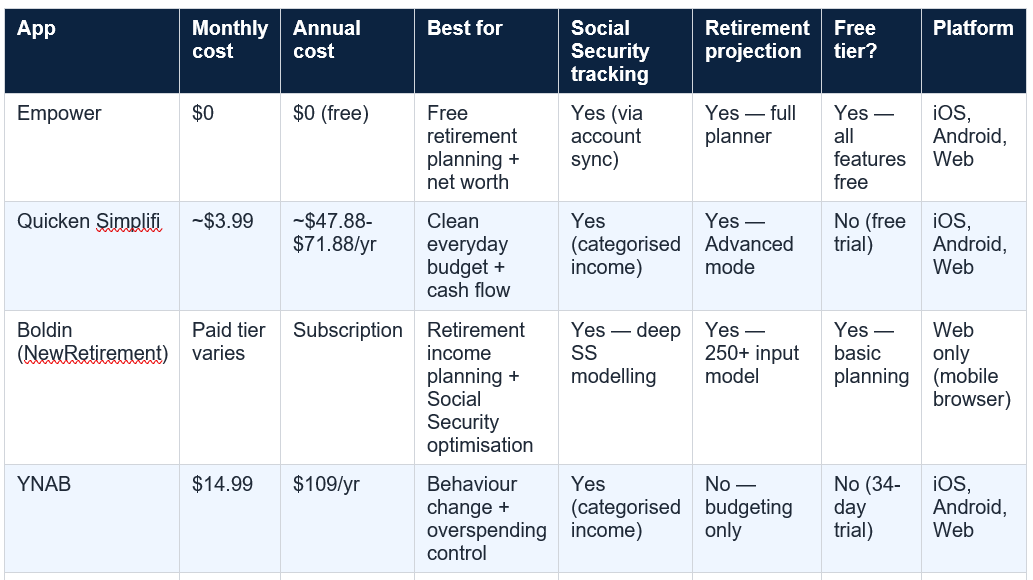
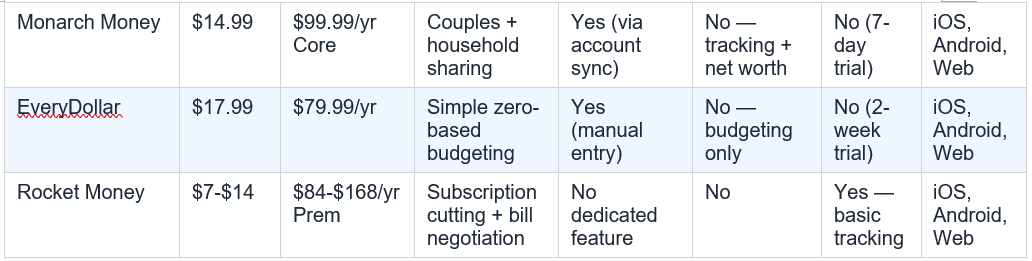
Side-by-Side Comparison: All Seven Apps at a Glance
Prices verified from published sources as of August 2026 (WalletGrower August 2026; CNBC Select April 2026; Quicken sources; Finny April 2026; Ramsey Solutions April 2026; Wall Street Survivor July 2026). Annual prices may reflect promotional rates. Always verify current pricing at each app's official website before subscribing. Not financial advice.
11. The Retirement Spending Reality: What the Data Says
Understanding what retirees actually spend money on — and where they consistently underestimate costs — provides the context for evaluating which budgeting app features will deliver the most practical value.Average annual spending: adults 65 and over spend $60,087/year ($5,007/month) on average, according to Bureau of Labor Statistics data cited by Mercer Advisors in January 2026. The largest spending categories are housing, transportation, healthcare, and food. Healthcare alone averages 16% of total monthly income (Schroders 2026) — approximately $801/month on $60,087/year. Medicare Part B: $202.90/month ($2,434.80/year) in 2026. Food: 67% of retirees say they are spending more than planned on groceries (Clever Real Estate 2026). Insurance premiums: 60% of retirees say they spent more than predicted (Clever Real Estate 2026). 39% of retirees say they do not stick to a strict budget. $823,000: what retirees say is needed to retire comfortably — but only 23% have $500,000 or more saved.
The four areas where retirees most consistently overspend relative to their pre-retirement plans are groceries (67% of retirees spending more than expected), insurance premiums (60%), healthcare broadly, and what the Schroders survey describes simply as 'unexpected expenses' — the category that every retired person knows exists but that almost no pre-retirement budget adequately captures. A budgeting app that tracks these categories in real time — connecting to every account that generates transactions in these areas — provides the visibility that prevents chronic overspending from quietly depleting savings.
The 60% of US adults paying for at least one subscription they no longer actively use (SavingAdvice.com June 2026) is a specific, findable, and fixable cost category for retirees. Streaming services, premium app subscriptions, fitness memberships, and annual renewals that no longer reflect current usage are common in households that signed up for services over many years. For retirees who use Rocket Money to identify and cancel even two unused $15/month subscriptions, the app pays for itself within the first month at the free tier.
How to Choose the Right App for Your Situation
No single app is the right choice for every retiree. The decision should be driven by your primary financial challenge and the way you want to engage with your finances — not by features you are unlikely to use.- If you want a free, comprehensive starting point: begin with Empower. Connect all your accounts, explore the retirement planner and net worth dashboard, and use it for 30 days before considering a paid upgrade. The free tools are substantive enough to serve many retirees indefinitely.
- If your primary concern is whether your savings will last: Boldin's PlannerPlus is the most analytically powerful option for Social Security optimisation, Roth conversion modelling, and long-term withdrawal strategy. Pair it with Empower's free daily spending tracker if you also want transaction-level visibility.
- If you are a retired couple managing joint finances: Monarch Money's household sharing is a genuine advantage, and the $99.99/year cost splits effectively to $50 per person for the household. Run the 7-day trial with real accounts connected before committing.
- If you are overspending your monthly budget: YNAB's zero-based approach with its required weekly review produces behaviour change that passive tracking apps do not. The 34-day free trial is long enough to establish whether the system works for you. EveryDollar offers a simpler version of the same approach at a slightly lower annual price.
- If you want the cheapest paid option: Quicken Simplifi at approximately $3.99/month gives you clean spending tracking, cash flow projection, and retirement planning tools at the lowest annual subscription cost on this list. CNBC Select's 3-year consecutive 'Best for Planners' award provides independent validation.
- If you want to find and cancel unused subscriptions first: start with Rocket Money's free tier. Run it for 30 days to identify all recurring charges. Cancel what you do not use. Then reassess whether the Premium tier's bill negotiation service justifies the ongoing cost.
Conclusion
The retirement financial stress data from Schroders' 2026 survey — 58% not knowing how long savings will last, 64% wishing they had planned more, 49% spending more than expected — is a picture of retirees flying partially blind through one of the most financially consequential phases of their lives. A budgeting app does not solve every retirement financial challenge. But it does convert a partial-information situation into a fully visible one.The best free option in 2026 is Empower: a genuine retirement planning toolkit at zero cost, with no meaningful features locked behind a paywall. The best paid option for everyday spending clarity is Quicken Simplifi, which has earned three consecutive CNBC Select 'Best for Planners' awards and comes in at the lowest annual price of any premium app on this list. The best option for retirees with complex Social Security and withdrawal decisions is Boldin, which offers analytical depth that no general budgeting app matches. The best option for couples is Monarch Money; for strict zero-based budgeters, YNAB or EveryDollar; for subscription elimination as a first step, Rocket Money's free tier.
The 39% of retirees who say they do not stick to a strict budget are not fundamentally different from those who do. They simply have not yet found the system that makes staying within a budget feel natural rather than like work. One of the seven apps in this guide is designed for exactly their situation — the task is simply finding out which one it is, using the free trials every app provides before spending a penny.
Frequently Asked Questions
What is the best free budgeting app for retirees in 2026?Empower Personal Dashboard is the best free budgeting app for retirees in 2026. The free tools include a full retirement planner (which projects how long your savings will last based on linked accounts), a net worth dashboard that consolidates all accounts, a cash flow and budgeting tool, a savings planner, and a fee analyser that identifies excessive investment management charges. NerdWallet named Empower the 'Best budget app for tracking wealth and spending' in January 2026. The free tools are fully functional and complete — there is no meaningful feature locked behind a paywall, though the company offers a paid managed investment service and will prompt users to consider it. The free tools can be used indefinitely without engaging any paid service. Start at empower.com or download the app from the App Store or Google Play.
Do retirees really need a separate budgeting app from their bank?
Yes — for most retirees, a dedicated budgeting app provides capabilities that bank portals do not. Banks typically show transaction history and account balances for their own accounts only. A budgeting app connects multiple banks, investment accounts, brokerage accounts, and credit cards into a single dashboard, automatically categorises all transactions, and — for retirement-specific tools like Boldin and Empower — projects future account balances and models the sustainability of current withdrawal rates. 58% of retirees do not know how long their retirement savings will last (Schroders 2026). A bank portal will not answer that question. A retirement planning app like Boldin or Empower's retirement planner will. For retirees with multiple income sources (Social Security, pension, IRA withdrawals, dividends) and multiple account types, the consolidated visibility a budgeting app provides is substantively different from what any single bank portal offers.
Is YNAB worth it for retirees?
YNAB is worth it for a specific type of retiree: one who is overspending their monthly budget, has tried passive tracking apps without changing their habits, and is willing to invest the time required to build the zero-based budgeting habit YNAB requires. At $109 per year ($14.99/month), YNAB is the most expensive subscription app on this list. It has no free tier, only a 34-day free trial. The learning curve is real, and it requires a genuine weekly review commitment to work as designed. For retirees who are within budget and primarily want to track spending and model retirement projections, the free Empower tools or the lower-cost Quicken Simplifi ($47-72/year) are better fits. But for retirees who need actual behaviour change — who consistently find themselves at the end of the month having overspent dining, travel, or discretionary categories — YNAB's structured approach produces results that passive trackers do not. The 34-day trial is long enough to evaluate whether the system works.
Can budgeting apps track Social Security and RMDs?
Yes — the apps on this list can track Social Security deposits and Required Minimum Distributions, though the depth of tracking varies. At the basic level, every app with account syncing (Empower, Simplifi, Monarch Money, YNAB, Boldin PlannerPlus) will automatically detect and categorise Social Security deposits when they hit a linked bank account. You can label them as 'Social Security income' or create a dedicated income category for them. For RMDs: apps that sync investment accounts (Empower, Monarch Money, Simplifi) can detect when a withdrawal is made from a traditional IRA or 401(k). Boldin goes further and actively models RMDs in its retirement projection — incorporating the IRS's required minimum distribution schedule into projections of future account balances and tax liability. If RMD planning is a central concern, Boldin's PlannerPlus is the most analytically complete option for modelling the impact of different withdrawal strategies across account types.
What is the best budgeting app for tracking healthcare costs in retirement?
Empower and Quicken Simplifi both support healthcare expense tracking through account syncing and customisable expense categories. You can create specific categories for Medicare Part B premiums, Medigap premiums, prescription costs, and out-of-pocket medical spending — providing the granular visibility that is important given healthcare's 16% average share of retirement income (Schroders 2026). Boldin's PlannerPlus tier includes dedicated Medicare cost planning as part of its retirement projection framework — making it particularly useful for modelling how Medicare premium increases (projected to rise more than 11% for Part B in 2026, per a Motley Fool analysis cited on Nasdaq) will affect long-term retirement income. For everyday healthcare expense tracking, Empower (free) or Simplifi (~$3.99/month) are the most practical options. For forward-looking Medicare cost modelling as part of a retirement plan, Boldin PlannerPlus is the specialist tool.
0 Comments
Be the first to share your thoughts on this article.