

Budgeting
How to Use AI to Build a Better Budget (and Avoid Its Traps)

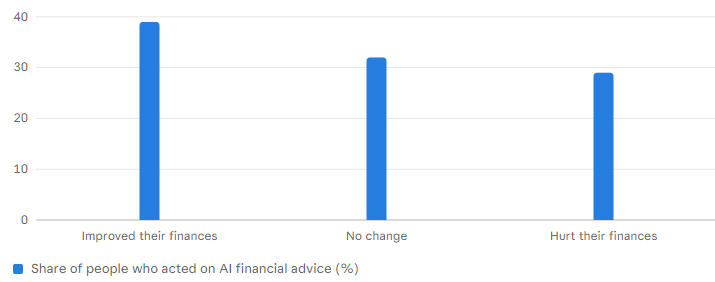
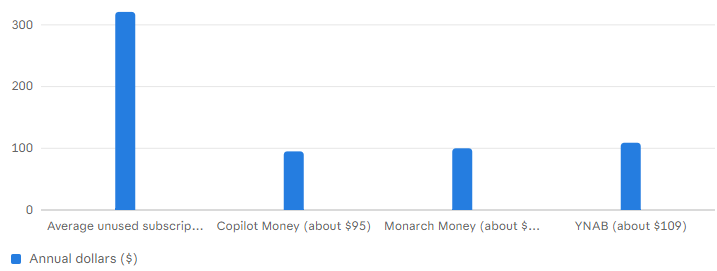
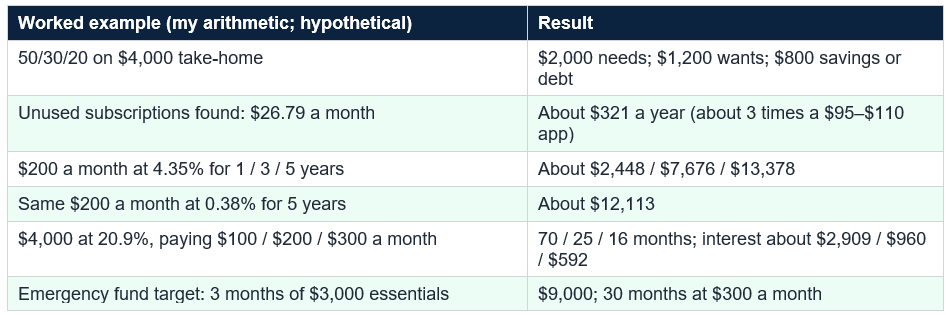
Adoption and trust (surveys as reported): 55% of Americans used AI to help with financial-management decisions but only 18% would trust it to make recommendations on its own (TD Bank, March 2026); 26% have used chatbots for personal finance questions (another survey); among people who acted on AI financial advice, 39% said it helped, 29% said it hurt and 32% saw no change (NerdWallet, June 2026); 63% of US consumers in one cited study doubted AI tools keep financial data safe (OECD report). Where the money is: nearly 60% of subscribers have an unused subscription costing an average of $26.79 a month, about $321 a year (Self Financial, 2026); top apps cost about $95 to $110 a year; 46% of Americans could cover three months of expenses and 27% six months (Bankrate); the average card APR is about 20.9%; top savings accounts pay about 4.35%. My arithmetic: unused subscriptions are about three times the annual cost of a $95–$110 app; $200 a month at 4.35% grows to about $13,400 in five years (against about $12,100 at 0.38%); a $4,000 card balance at 20.9% takes 25 months and about $960 of interest at $200 a month versus 16 months and about $590 at $300.
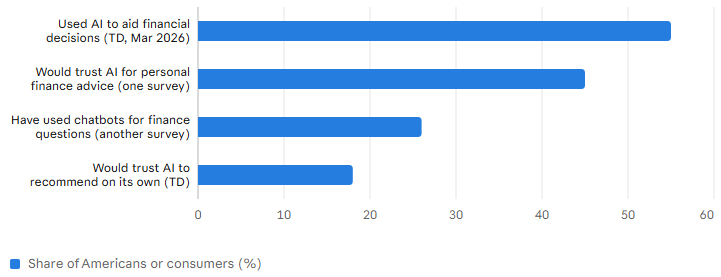
The fine print is that these tools can be wrong, handle some of the most sensitive data you have and divide opinion on how far to trust them. In a TD Bank survey from March 2026, as reported by secondary sources, 55% of Americans said they used AI to help with financial decisions, but only 18% would trust it to make a recommendation on its own. This guide shows what AI does well, where it falls short and how to set it up safely without giving up your judgment.
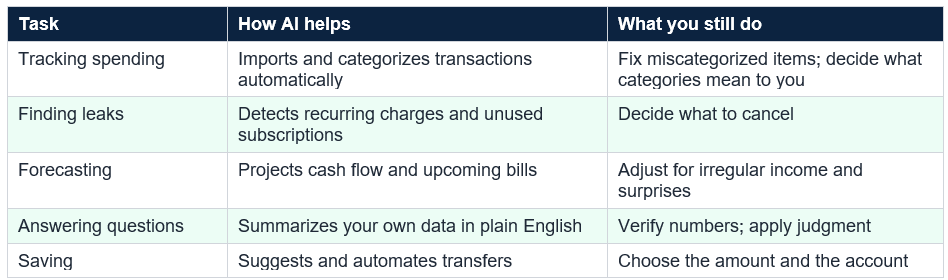
The second strength is conversation: several tools now include an assistant that answers questions about your own data, such as how much you spent on travel or what changed from last month. Monarch says its assistant uses guidance shaped by in-house financial planners, and Copilot says its assistant uses data already in the product and asks permission before editing, per one review. The third is nudging: automatic savings transfers, overdraft alerts and bill reminders. None of this is magic, but it replaces hours of manual work with minutes of reviewing.
Prices from secondary sources are roughly $95 to $110 a year for the leading paid apps (Copilot about $95, Monarch about $100, YNAB about $109), with Empower called the strongest free option and Rocket Money offering a free tier with premium plans. Free apps earn money differently, and one review warns that the primary data risk is the sale of anonymized spending data to financial institutions, common among free tiers. Pick by need: couples may want shared access, subscription hunters Rocket Money and method lovers YNAB. I cannot verify each claim, and features change often.
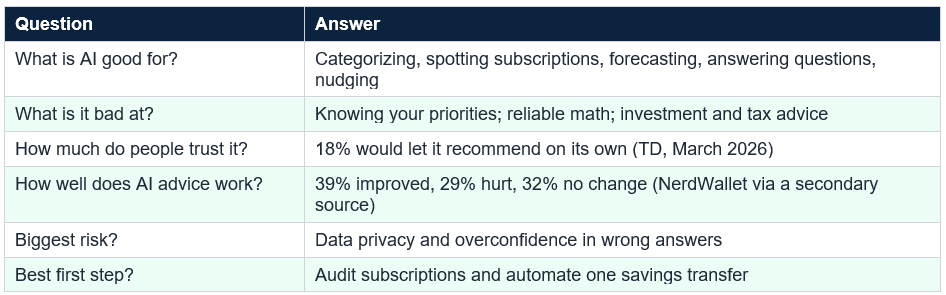
The main caution is arithmetic. Chatbots are language tools and can make math errors or state wrong numbers confidently, so check any calculation with a spreadsheet or calculator and ask the tool to show its work. They cannot see your full situation, so do not ask them to decide for you. For tax, investment, legal or debt-settlement decisions, treat a chatbot as a way to prepare good questions for a professional, and remember that responses may be stored, so check the provider’s privacy settings.
Keep it small and repeat. The goal of the first month is a working loop, not a perfect budget: the tool collects, you review, you adjust, with ten minutes weekly and thirty monthly. If you fall off, simplify instead of quitting: track three categories, or use the app only for subscriptions. A budget you use at 80% accuracy beats a perfect one you abandon; as one commentator put it, the real cost of budgeting has always been attention, not subscription fees.
Open your last statement, highlight every recurring charge and ask yourself of each: did I use this in the last month? Cancel what you did not, then set an automatic transfer for the amount you freed up.
Third, automated savings: $200 a month into a 4.35% account grows to about $2,448 after one year, $7,676 after three and $13,378 after five, against about $12,113 at 0.38% over five years, so the account matters as much as the habit. Fourth, debt: a $4,000 card balance at 20.9% costs about $836 a year in interest. Paying $200 a month clears it in 25 months with about $960 of interest, $300 takes 16 months and about $592, and $100 takes 70 months and about $2,909. AI can find the extra $100 in your budget; you have to send it.
Surveys (as reported): 55% of Americans used AI for financial-management decisions but only 18% would trust it to recommend on its own (TD, March 2026); of people who acted on AI financial advice, 39% improved, 29% were hurt, 32% saw no change (NerdWallet, June 2026). Unused subscriptions average $26.79 a month (about $321 a year). $200 a month at 4.35% reaches about $13,378 in five years.
Third, judgment: AI does not know you are saving for a wedding or supporting a parent and cannot weigh those priorities. Fourth, behavior: making spending visible does not make you change it. Fifth, over-reliance: if you hand off all your thinking you may not notice when something is wrong. The sensible approach is the one most Americans say they prefer: use AI for assistance and keep humans, meaning you and, for big decisions, a qualified professional, making the choices.
AI can be confidently wrong, and a survey found 29% of people who acted on AI financial advice said it hurt them. Verify calculations, be skeptical of product pitches and never share passwords, full account numbers or Social Security numbers.
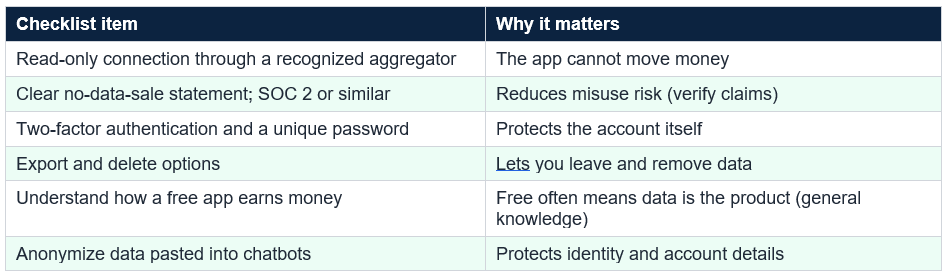
Before you connect, check a few things: a clear statement that the company does not sell your data (Monarch and others say so; I did not verify), certifications such as SOC 2, two-factor authentication, the ability to export and delete your data and how the free tier makes money. Use a unique password and a password manager, turn on bank alerts and review connected apps periodically. With chatbots, anonymize what you paste. And beware of scams: fake apps, “debt relief” offers and impersonators may exploit interest in AI tools (general knowledge).
The best use of AI is to lower the friction of good habits: automate savings on payday, set alerts, review weekly and keep a short list of goals. Choose the simplest system you will actually open every week: if a spreadsheet does it, use a spreadsheet; if an app and its AI assistant keep you engaged, use that. The tool is a means, and the habit is the goal.
Habit Why it matters (sources and my arithmetic)
Common mistakes include trusting AI math without checking, pasting raw statements or account numbers into a chatbot, connecting accounts without reading privacy terms, buying several apps and using none, letting an app’s product suggestions replace your own comparison and tracking everything but never changing behavior. Most failures come from skipping the weekly review, not from the technology.
But the evidence urges caution. Only 18% of Americans would trust AI to recommend on its own, and in one survey 29% of people who acted on AI financial advice said it hurt them. Treat AI as an assistant for awareness and organization, check its math, protect your data and keep decisions with you; your own habits, like paying down a 20.9% card and building a cushion, matter more than any tool.
It can sort transactions into categories automatically, spot recurring charges and subscriptions you forgot, forecast upcoming cash flow, answer plain-English questions about your spending and nudge you toward goals such as automatic savings. It cannot know your priorities, and it can be wrong, so treat its output as a draft to check. Tools differ: some apps have documented AI features and others, such as YNAB, say little or nothing about AI.
Is it safe to connect my bank accounts to a budgeting app?
Most major apps connect through aggregators such as Plaid with read-only access, which means the app cannot move money, but they still store your transaction history on their servers. Look for a clear statement that the company does not sell your data, security certifications such as SOC 2, two-factor authentication and an easy way to delete your data. Never share passwords or account numbers with a chatbot. This is general education, not personal advice.
Can I just use a general chatbot like ChatGPT or Claude to budget?
Yes, for planning and analysis, if you protect your data. Remove names, account numbers and exact locations, paste a summary or a cleaned spreadsheet, and ask for categories, a spending plan or questions to consider. Then check the arithmetic yourself or with a spreadsheet, since chatbots can make calculation errors, and do not ask for personalized investment or tax decisions without checking with a professional.
How accurate is AI financial advice?
Mixed. A NerdWallet survey from June 2026, as reported by a secondary source, found that among people who acted on AI financial advice, 39% said it improved their finances, 29% said it hurt them and 32% saw no change. A TD Bank survey from March 2026 found only 18% would trust AI to make a financial recommendation on its own. Use AI for awareness and organization, and keep human judgment for big decisions.
How much money can AI help me save?
It depends on what it finds. One 2026 survey reported by a budgeting-app review says nearly 60% of subscribers have an unused subscription costing an average of $26.79 a month, or about $321 a year. In my arithmetic, automating $200 a month into a 4.35% savings account would reach about $13,400 in five years. Results vary, and the biggest gains usually come from your own habits, not the tool.
Table of Contents
- The Promise and the Fine Print
- The Short Answer
- What AI Is Good At
- The Tool Landscape
- Using a General Chatbot Safely
- A 30-Day Setup Plan
- Four Worked Examples
- Where AI Falls Short
- Privacy and Security Checklist
- Habits Beat Technology
- Conclusion
- Frequently Asked Questions
Using AI for money vs. trusting it: survey results as reported (%)
Share of respondents (%) by Secondary-source reports of TD Bank (March 2026) and other surveys via VeraMoney and Perplexity AI Magazine; different surveys, wording and samples, and the figures conflict (another source says 37%
Does AI financial advice work? Outcomes for people who acted on it (%)
Share of respondents (%) by NerdWallet survey, June 2026, as reported by VeraMoney (secondary source; original not retrieved): 39% improved, 32% no change, 29% hurt; the three shares total 100%
Can the tool pay for itself? Average unused-subscription waste vs. annual app prices ($)
Dollars per year ($) by Self Financial 2026 survey as reported by BestMoney ($26.79 a month, about $321 a year; nearly 60% of subscribers have an unused subscription)
The Promise and the Fine Print
Anyone who has tried to keep a budget knows the hard part is not the plan but the grunt work: sorting hundreds of transactions, remembering which subscription renews when and noticing that dining out crept up again. That is what modern AI tools are built to take over. They connect to your accounts, categorize spending automatically, flag unusual and recurring charges and answer plain-English questions such as “why was my spending higher in October?” The promise is that budgeting becomes less of a chore, so you stick with it.The fine print is that these tools can be wrong, handle some of the most sensitive data you have and divide opinion on how far to trust them. In a TD Bank survey from March 2026, as reported by secondary sources, 55% of Americans said they used AI to help with financial decisions, but only 18% would trust it to make a recommendation on its own. This guide shows what AI does well, where it falls short and how to set it up safely without giving up your judgment.
The Short Answer
Use AI for the tedious parts of budgeting: categorizing transactions, finding forgotten subscriptions, forecasting cash flow and reminding you of goals. Keep the decisions, such as what matters to you and how much risk to take, for yourself, and check anything involving math or big money. Pick a tool with clear privacy terms, or use a general chatbot with anonymized data. The typical unused subscription, about $26.79 a month, costs about $321 a year, roughly three times the price of a budgeting app, so a few forgotten charges can pay for the tool. But the larger gains come from habits no app can do for you: automating savings, paying down high-interest debt and spending less than you earn.
What AI Is Good At
AI shines at pattern recognition on large amounts of repetitive data, which describes your transaction history. It can sort a year of purchases into categories without you tagging each one, learn that a merchant is groceries and not dining and detect recurring charges even when the amount changes. A review claims about 94% categorization accuracy for Copilot Money (the reviewer’s figure, unverified), and a 6% error rate on 1,000 transactions would be about 60 to fix a year, which is manageable. It can also forecast cash flow, warning you that rent and a car payment land the week your paycheck is late.The second strength is conversation: several tools now include an assistant that answers questions about your own data, such as how much you spent on travel or what changed from last month. Monarch says its assistant uses guidance shaped by in-house financial planners, and Copilot says its assistant uses data already in the product and asks permission before editing, per one review. The third is nudging: automatic savings transfers, overdraft alerts and bill reminders. None of this is magic, but it replaces hours of manual work with minutes of reviewing.
The Tool Landscape
The market is crowded and changing fast, and not every “AI” budgeting app has much AI. One audit found documented AI features in Monarch, Copilot, Cleo, Origin and Vera (Monarch names OpenAI, Anthropic and Google as providers) but none in YNAB, Goodbudget, EveryDollar and Emma, while Rocket Money describes only its algorithm, mainly for subscription detection. That does not make YNAB worse: its zero-based method, which gives every dollar a job, is well regarded, and one reviewer concludes that method can matter more than machine intelligence.Prices from secondary sources are roughly $95 to $110 a year for the leading paid apps (Copilot about $95, Monarch about $100, YNAB about $109), with Empower called the strongest free option and Rocket Money offering a free tier with premium plans. Free apps earn money differently, and one review warns that the primary data risk is the sale of anonymized spending data to financial institutions, common among free tiers. Pick by need: couples may want shared access, subscription hunters Rocket Money and method lovers YNAB. I cannot verify each claim, and features change often.
Using a General Chatbot Safely
You do not need a dedicated app to benefit. A general chatbot can help you design a budget, brainstorm ways to cut spending or turn a messy list of expenses into categories. The safest approach is to give it a cleaned summary instead of raw data: remove names, account numbers, addresses and anything identifying, and paste monthly totals by category or an anonymized spreadsheet. Then ask specific questions, such as “here are my monthly totals; suggest a plan to build a three-month emergency fund by next September.”The main caution is arithmetic. Chatbots are language tools and can make math errors or state wrong numbers confidently, so check any calculation with a spreadsheet or calculator and ask the tool to show its work. They cannot see your full situation, so do not ask them to decide for you. For tax, investment, legal or debt-settlement decisions, treat a chatbot as a way to prepare good questions for a professional, and remember that responses may be stored, so check the provider’s privacy settings.
A 30-Day Setup Plan
Here is a simple plan. In week one, gather your last three months of income and spending, by connecting an app or exporting statements to a spreadsheet, and let the tool categorize everything, then fix mistakes. In week two, audit recurring charges and cancel or downgrade anything you do not use. In week three, set a budget, such as 50/30/20 for needs, wants and savings or debt payments, with an automatic transfer on payday. In week four, review how it went, adjust the categories and set one alert, such as a low-balance warning or weekly spending summary.Keep it small and repeat. The goal of the first month is a working loop, not a perfect budget: the tool collects, you review, you adjust, with ten minutes weekly and thirty monthly. If you fall off, simplify instead of quitting: track three categories, or use the app only for subscriptions. A budget you use at 80% accuracy beats a perfect one you abandon; as one commentator put it, the real cost of budgeting has always been attention, not subscription fees.
Open your last statement, highlight every recurring charge and ask yourself of each: did I use this in the last month? Cancel what you did not, then set an automatic transfer for the amount you freed up.
Four Worked Examples
Numbers make the case. First, a 50/30/20 plan on $4,000 of monthly take-home pay: $2,000 for needs, $1,200 for wants and $800 for savings or debt payments. If categorization shows your needs are actually $2,400, you must trim wants to $1,000 or savings to $600, the kind of insight tracking provides. Second, subscriptions: finding $26.79 a month of unused charges, the survey average, frees about $321 a year, and $50 a month would free $600.Third, automated savings: $200 a month into a 4.35% account grows to about $2,448 after one year, $7,676 after three and $13,378 after five, against about $12,113 at 0.38% over five years, so the account matters as much as the habit. Fourth, debt: a $4,000 card balance at 20.9% costs about $836 a year in interest. Paying $200 a month clears it in 25 months with about $960 of interest, $300 takes 16 months and about $592, and $100 takes 70 months and about $2,909. AI can find the extra $100 in your budget; you have to send it.
Surveys (as reported): 55% of Americans used AI for financial-management decisions but only 18% would trust it to recommend on its own (TD, March 2026); of people who acted on AI financial advice, 39% improved, 29% were hurt, 32% saw no change (NerdWallet, June 2026). Unused subscriptions average $26.79 a month (about $321 a year). $200 a month at 4.35% reaches about $13,378 in five years.
Where AI Falls Short
The limits matter. First, accuracy: the NerdWallet survey found that 29% of people who acted on AI financial advice said it hurt them, nearly as many as the 39% who said it helped, so blindly following AI is close to a coin flip. Chatbots can state wrong numbers, miss context or give generic advice, and budgeting tools can miscategorize. Second, duty: budgeting guidance is not regulated like investment advice, and most apps owe you no fiduciary duty, per one audit, and some use your data to market financial products.Third, judgment: AI does not know you are saving for a wedding or supporting a parent and cannot weigh those priorities. Fourth, behavior: making spending visible does not make you change it. Fifth, over-reliance: if you hand off all your thinking you may not notice when something is wrong. The sensible approach is the one most Americans say they prefer: use AI for assistance and keep humans, meaning you and, for big decisions, a qualified professional, making the choices.
AI can be confidently wrong, and a survey found 29% of people who acted on AI financial advice said it hurt them. Verify calculations, be skeptical of product pitches and never share passwords, full account numbers or Social Security numbers.
Privacy and Security Checklist
Financial data is among the most sensitive you have: one source cites Pew research that 78% of Americans say it is the data they most want protected, and an OECD report cites a study in which 63% of US consumers doubted AI tools keep it safe. Most apps link accounts with read-only access through aggregators such as Plaid or MX, so the app cannot move money, but your full transaction history still goes to the provider’s cloud servers and is subject to its policies, breaches and future changes such as an acquisition.Before you connect, check a few things: a clear statement that the company does not sell your data (Monarch and others say so; I did not verify), certifications such as SOC 2, two-factor authentication, the ability to export and delete your data and how the free tier makes money. Use a unique password and a password manager, turn on bank alerts and review connected apps periodically. With chatbots, anonymize what you paste. And beware of scams: fake apps, “debt relief” offers and impersonators may exploit interest in AI tools (general knowledge).
Habits Beat Technology
It is easy to buy a tool and expect it to fix your finances, but the numbers suggest otherwise. Only 46% of Americans could cover three months of expenses and 27% six months (Bankrate), the average card charges about 20.9% interest and inflation was 3.7% in September, so the biggest gains come from building a cushion and paying down debt, not from a prettier dashboard. AI can show you where your money goes, but it takes a decision to send $300 to savings or an extra $100 to a card.The best use of AI is to lower the friction of good habits: automate savings on payday, set alerts, review weekly and keep a short list of goals. Choose the simplest system you will actually open every week: if a spreadsheet does it, use a spreadsheet; if an app and its AI assistant keep you engaged, use that. The tool is a means, and the habit is the goal.
Habit Why it matters (sources and my arithmetic)
Common mistakes include trusting AI math without checking, pasting raw statements or account numbers into a chatbot, connecting accounts without reading privacy terms, buying several apps and using none, letting an app’s product suggestions replace your own comparison and tracking everything but never changing behavior. Most failures come from skipping the weekly review, not from the technology.
Conclusion
AI can make budgeting easier by taking over the grunt work: it categorizes transactions, finds forgotten subscriptions, forecasts cash flow, answers questions about your data and automates savings. That matters because the average unused subscription costs about $321 a year, roughly three times the price of a budgeting app, and small automatic habits compound: $200 a month at 4.35% reaches about $13,400 in five years. A 30-day plan of importing data, auditing subscriptions, setting an automatic transfer and reviewing weekly is enough to start.But the evidence urges caution. Only 18% of Americans would trust AI to recommend on its own, and in one survey 29% of people who acted on AI financial advice said it hurt them. Treat AI as an assistant for awareness and organization, check its math, protect your data and keep decisions with you; your own habits, like paying down a 20.9% card and building a cushion, matter more than any tool.
Frequently Asked Questions
What can AI actually do for my budget?It can sort transactions into categories automatically, spot recurring charges and subscriptions you forgot, forecast upcoming cash flow, answer plain-English questions about your spending and nudge you toward goals such as automatic savings. It cannot know your priorities, and it can be wrong, so treat its output as a draft to check. Tools differ: some apps have documented AI features and others, such as YNAB, say little or nothing about AI.
Is it safe to connect my bank accounts to a budgeting app?
Most major apps connect through aggregators such as Plaid with read-only access, which means the app cannot move money, but they still store your transaction history on their servers. Look for a clear statement that the company does not sell your data, security certifications such as SOC 2, two-factor authentication and an easy way to delete your data. Never share passwords or account numbers with a chatbot. This is general education, not personal advice.
Can I just use a general chatbot like ChatGPT or Claude to budget?
Yes, for planning and analysis, if you protect your data. Remove names, account numbers and exact locations, paste a summary or a cleaned spreadsheet, and ask for categories, a spending plan or questions to consider. Then check the arithmetic yourself or with a spreadsheet, since chatbots can make calculation errors, and do not ask for personalized investment or tax decisions without checking with a professional.
How accurate is AI financial advice?
Mixed. A NerdWallet survey from June 2026, as reported by a secondary source, found that among people who acted on AI financial advice, 39% said it improved their finances, 29% said it hurt them and 32% saw no change. A TD Bank survey from March 2026 found only 18% would trust AI to make a financial recommendation on its own. Use AI for awareness and organization, and keep human judgment for big decisions.
How much money can AI help me save?
It depends on what it finds. One 2026 survey reported by a budgeting-app review says nearly 60% of subscribers have an unused subscription costing an average of $26.79 a month, or about $321 a year. In my arithmetic, automating $200 a month into a 4.35% savings account would reach about $13,400 in five years. Results vary, and the biggest gains usually come from your own habits, not the tool.
0 Comments
Be the first to share your thoughts on this article.