

Savings
5 Easy Ways To Track Your Expenses and Save More Money

You don’t need a complicated system. You need one that you’ll actually use. Here are five methods — from phone apps to pen and paper — and how to choose the right one for the way your brain works.
Most people know they spend too much somewhere. They just do not know exactly where. A daily $5 coffee adds up to $1,825 a year. A forgotten streaming subscription at $12 a month is $144. A habit of ordering delivery twice a week instead of cooking can cost $2,000-$4,000 a year. None of these are unusual. None of them are noticed until someone actually tracks their spending. The good news, as Chime’s April 2026 guide to tracking expenses puts it plainly: ‘Expense tracking doesn’t have to be complicated. The method that works is the one you’ll actually use.’ This article covers five ways to track your spending, from the fully automated to the deliberately low-tech, each with a clear step-by-step starting guide and an honest assessment of who it works best for.
The practical case is equally compelling. TheBricks.com’s April 2025 tracking guide illustrates the compound effect of small unnoticed purchases: it is easy to overlook small, frequent purchases — like a daily $5 latte — that add up over time. A daily $5 purchase is $1,825 per year. A pair of $15-per-month forgotten streaming subscriptions is $360. A food delivery habit of three times per week adds $100-$150 per week, or $5,200-$7,800 per year. None of these are unusual spending patterns. All of them are invisible without tracking. And all of them become immediately and permanently visible the moment you begin recording your transactions systematically. More than half of Americans say budgeting and tracking expenses is the most valuable way to manage their finances, according to an Empower 2023 study cited across multiple 2026 personal finance guides. Tracking is the diagnostic that makes everything else possible.
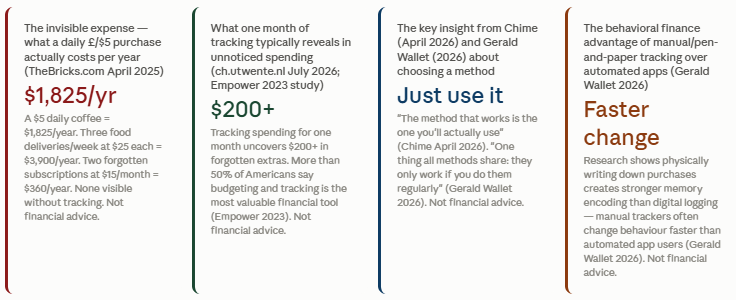
Tracking for one month typically uncovers $200+ in forgotten expenses (ch.utwente.nl 2026). A daily $5 latte = $1,825/year. Three food deliveries/week = $5,200-$7,800/year. More than 50% of Americans say budgeting and tracking is the most valuable financial tool (Empower 2023 study).
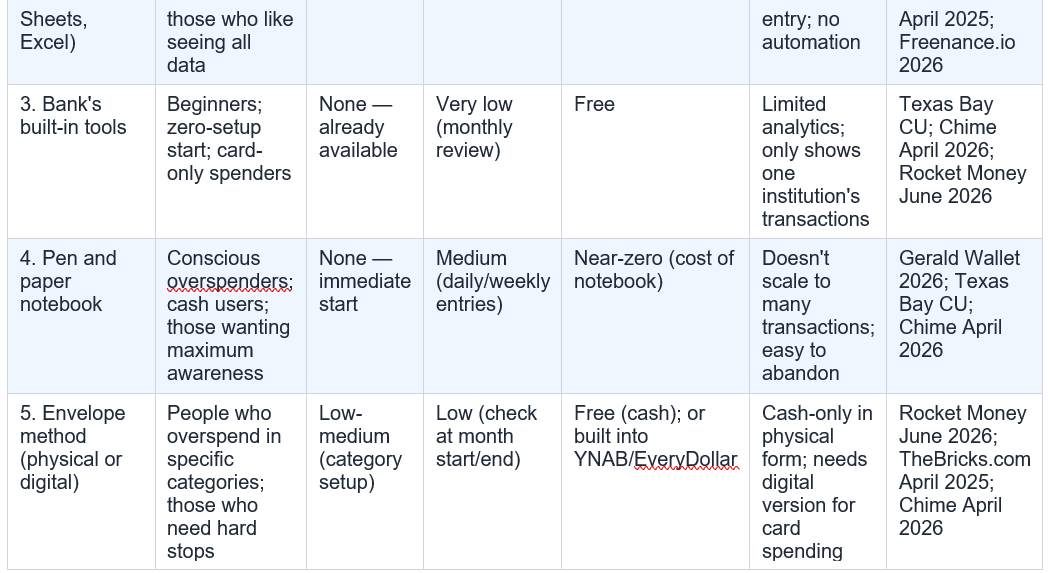
If you want automation: start with a budgeting app (Method 1). If you want control and zero data-sharing: start with a spreadsheet (Method 2). If you want the simplest possible starting point today: open your banking app and review last month’s transactions (Method 3). If you overspend unconsciously and want heightened awareness: try pen and paper tracking (Method 4). If you repeatedly overspend in one specific category: use the envelope method for that category only (Method 5).
How to start: Step 1: Download one app — Rocket Money, YNAB, PocketGuard, or EveryDollar are all widely used in 2026. Step 2: Connect your bank accounts and credit cards. Step 3: Review and correct any miscategorised transactions in week one. Step 4: Set spending limits by category. Step 5: Check the app once a week — not daily. Let it work in the background.
How to start: Step 1: Open Google Sheets (free). Step 2: Create columns: Date | Description | Category | Amount | Method. Step 3: Create a categories dropdown using data validation. Step 4: Add a summary row with SUMIF formulas for each category. Step 5: Update every Sunday evening with the week’s transactions from your bank statement.
How to start: Step 1: Open your banking app or online banking portal right now. Step 2: Go to the transactions or spending section. Step 3: Review this month’s transactions — are they categorised? Step 4: If yes, use the spending summary to identify your top three categories. Step 5: Set a monthly calendar reminder to review your bank’s spending summary.
How to start: Step 1: Buy a small notebook and keep it with your wallet or in your pocket. Step 2: Write down every cash purchase immediately after it happens. Step 3: For card purchases, review your bank app at the end of each day and log anything unusual. Step 4: Every Sunday, total each category. Step 5: Compare month-on-month to see patterns.
How to start: Step 1: Identify one or two categories where you consistently overspend (most commonly: groceries, dining, entertainment, clothing). Step 2: Set a monthly budget for that category based on your income. Step 3: Either withdraw that amount in cash and put it in a physical envelope, or set up a digital spending pot in your bank or budgeting app. Step 4: When the envelope or pot is empty, the category is closed for the month.
Gerald Wallet’s 2026 guide makes an interesting distinction: some personal finance researchers argue that manual entry is actually a feature rather than a bug. The friction of typing each purchase reinforces awareness in a way that automatic syncing does not. This is the case for using a spreadsheet for the categories you want to be most mindful of, even if you use an app for everything else. The practical implication: start with one method, use it for at least 30 days, and only add a second method when the first is established as a habit.
The most effective combination in 2026: a budgeting app for automatic transaction capture + the envelope method applied to your single most problematic spending category. The app provides the full picture; the envelope provides the hard stop. Sources: TheBricks.com April 2025; Rocket Money June 2026; Gerald Wallet 2026. Not financial advice.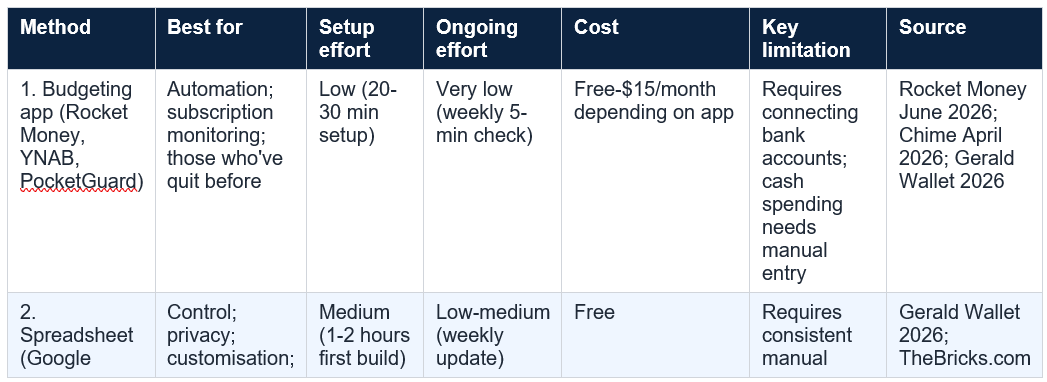
If you have not started tracking yet, here is the simplest possible beginning: open your banking app right now, go to the transactions section, and look at last month’s spending. Total the amounts in three categories: food (groceries plus dining out plus delivery), entertainment (streaming, subscriptions, going out), and miscellaneous. Whatever those three numbers are, they are your baseline. The goal of every tracking method in this article is to make those numbers smaller over time, by making them visible first. Texas Bay Credit Union’s tracking guide ends with a prediction that has proven accurate: track your spending throughout 2026, and by the time 2027 rolls around, you will thank yourself for having taken the time. Not financial or investment advice. Consult a qualified financial adviser for personalised guidance.
This depends on your personality and your primary goal. Budgeting apps are better for most people in 2026 because they automate the tedious part that causes most people to quit: manually downloading and categorising transactions. Rocket Money's June 2026 guide specifically identifies removing manual effort as the key benefit of apps. However, Gerald Wallet's 2026 guide cites behavioral finance research showing that manual tracking (pen and paper, or manual spreadsheet entry) creates stronger memory encoding than automated digital logging — meaning manual trackers often change their behaviour faster. The recommendation from Chime's April 2026 guide applies: the method that works is the one you'll actually use. Start with the banking app built into your existing bank account (zero friction) and graduate to a dedicated budgeting app or spreadsheet once the habit of reviewing your spending is established. Sources: Rocket Money June 2026; Chime April 2026; Gerald Wallet 2026.
What categories should I track?
The standard expense categories used by most personal finance guides are: housing (rent/mortgage, utilities); food (groceries, dining out, food delivery); transport (car, fuel, public transport); healthcare; personal care (haircuts, toiletries, clothing); entertainment (streaming, subscriptions, events, dining out); savings and debt repayment; and miscellaneous. Freenance.io's 2026 daily monitoring guide suggests a practical rule: housing should represent no more than 30% of total expenses; no other single category should exceed 10%. The most important step is starting with your main categories rather than trying to create an exhaustive list from the beginning. Freenance.io's advice: 'Start with main categories, then add details. Don't judge expenses — just collect data first.' Sources: Freenance.io 2026; Chime April 2026; TheBricks.com April 2025.
What if I keep forgetting to track my expenses?
Chime's April 2026 tracking guide addresses this directly: if you keep forgetting, automate as much as possible. A budgeting app that automatically downloads transactions removes the need to remember anything. For the residual manual entries (cash, or categories requiring deliberate attention), the fix is a weekly calendar reminder rather than a daily one. Freenance.io's 2026 guide suggests a morning check routine: look at yesterday's biggest expenses — were they planned? This takes less than two minutes and creates a consistent daily habit without requiring daily entry work. The most common reason for forgetting is that the system requires too much effort. The solution is almost always to simplify: one app, one weekly review, one rule (anything above $20 gets categorised immediately). Sources: Chime April 2026; Freenance.io 2026.
How do I track expenses if I have irregular income?
Chime's April 2026 tracking guide includes this scenario. For irregular income, the expense tracking methodology does not change — you still categorise and record spending in the same ways. What changes is the budgeting framework you use alongside the tracking. Instead of a fixed monthly budget, track expenses and expenses only for the first month without a target, building your baseline. Then calculate your average monthly income over the last three months and build a budget against that average. YNAB's zero-based budgeting approach, described in Gerald Wallet's 2026 guide, works particularly well for irregular income: you budget only the money you actually have on hand (not projected), assigning every actual pound or dollar a job. This means in a low-income month you automatically spend less, and in a high-income month you allocate the surplus deliberately. Sources: Chime April 2026; Gerald Wallet 2026.
Is there a free app to track expenses?
Yes. Gerald Wallet's 2026 expense tracking guide specifically notes that free options like Google Sheets and PocketGuard can be just as effective as paid software for personal tracking. Google Sheets is entirely free and requires only a Google account. PocketGuard has a free tier that connects bank accounts and categorises transactions automatically. EveryDollar has a free version (though the paid version syncs bank accounts). Your bank's built-in tools are free and already available with no additional setup. The only major tracking apps that are predominantly paid are YNAB ($14.99/month or $99/year in 2026 — verify current pricing) and Rocket Money's premium subscription tier. For most personal tracking needs, a combination of a bank's built-in tools, PocketGuard's free tier, or a Google Sheets template provides everything needed without any cost. Sources: Gerald Wallet 2026; Rocket Money June 2026. App costs change — verify with provider.
Most people know they spend too much somewhere. They just do not know exactly where. A daily $5 coffee adds up to $1,825 a year. A forgotten streaming subscription at $12 a month is $144. A habit of ordering delivery twice a week instead of cooking can cost $2,000-$4,000 a year. None of these are unusual. None of them are noticed until someone actually tracks their spending. The good news, as Chime’s April 2026 guide to tracking expenses puts it plainly: ‘Expense tracking doesn’t have to be complicated. The method that works is the one you’ll actually use.’ This article covers five ways to track your spending, from the fully automated to the deliberately low-tech, each with a clear step-by-step starting guide and an honest assessment of who it works best for.
Table of Contents
- Why Tracking Your Expenses Is the Foundation of Every Financial Goal
- How to Choose the Right Method for You
- Method 1 Budgeting Apps — The Automated Approach That Removes Willpower
- Method 2 Spreadsheets — Free, Flexible, and Completely in Your Control
- Method 3 Your Bank’s Built-In Tools — The Zero-Setup Starting Point
- Method 4 Pen and Paper — The Psychologically Powerful Low-Tech Option
- Method 5 The Envelope Method — Hard Stops for Problem Spending Categories
- Combining Methods for Better Results
- The Five Methods at a Glance: Comparison Table
- Conclusion: Start Today With the Easiest Step Available to You
- Frequently Asked Questions
Why Tracking Your Expenses Is the Foundation of Every Financial Goal
You cannot improve what you cannot measure. This is as true in personal finance as it is in any other discipline, and it is the reason that tracking expenses consistently sits at the top of every credible guide to managing money. Texas Bay Credit Union’s expense tracking guide puts the psychological case well: ‘Ever feel like you earn a decent paycheck but still wonder where it all went by the end of the month? Tracking your expenses gives you a clear picture of your financial habits. You might discover you’re spending more on subscription services you forgot about or dining out more often than you realised.’The practical case is equally compelling. TheBricks.com’s April 2025 tracking guide illustrates the compound effect of small unnoticed purchases: it is easy to overlook small, frequent purchases — like a daily $5 latte — that add up over time. A daily $5 purchase is $1,825 per year. A pair of $15-per-month forgotten streaming subscriptions is $360. A food delivery habit of three times per week adds $100-$150 per week, or $5,200-$7,800 per year. None of these are unusual spending patterns. All of them are invisible without tracking. And all of them become immediately and permanently visible the moment you begin recording your transactions systematically. More than half of Americans say budgeting and tracking expenses is the most valuable way to manage their finances, according to an Empower 2023 study cited across multiple 2026 personal finance guides. Tracking is the diagnostic that makes everything else possible.
Tracking for one month typically uncovers $200+ in forgotten expenses (ch.utwente.nl 2026). A daily $5 latte = $1,825/year. Three food deliveries/week = $5,200-$7,800/year. More than 50% of Americans say budgeting and tracking is the most valuable financial tool (Empower 2023 study).
How to Choose the Right Method for You
The single most important piece of advice from Chime’s April 2026 tracking guide is deceptively simple: ‘Whether you choose budgeting apps, spreadsheets, or simple account reviews, the method that works is the one you’ll actually use.’ Gerald Wallet’s 2026 expense tracking guide reinforces this: ‘One thing all methods share: they only work if you do them regularly.’ Before choosing a method, answer three questions: Am I willing to spend five minutes per day actively managing my tracking, or do I need it to happen automatically? Am I comfortable connecting my bank accounts to a third-party app, or do I prefer to keep my data within my bank? Which category of spending is my biggest problem: recurring subscriptions, variable spending like food, or occasional big-ticket impulses?If you want automation: start with a budgeting app (Method 1). If you want control and zero data-sharing: start with a spreadsheet (Method 2). If you want the simplest possible starting point today: open your banking app and review last month’s transactions (Method 3). If you overspend unconsciously and want heightened awareness: try pen and paper tracking (Method 4). If you repeatedly overspend in one specific category: use the envelope method for that category only (Method 5).
Method 1 Budgeting Apps — The Automated Approach That Removes Willpower
If you have tried to track expenses before and given up, the most likely reason is that the tracking method required daily manual effort that gradually became too much friction to sustain. Budgeting apps exist specifically to solve this problem. Rocket Money’s June 2026 guide to tracking monthly expenses describes their core value directly: by automating the difficult or tedious aspects of expense tracking, apps remove the headaches that cause people to give up while still giving users clarity into their finances and a variety of tools to better manage their cash flow. The way most budgeting apps work is straightforward: you connect your bank accounts and credit cards, and the app automatically downloads and categorises every transaction. Most transactions are categorised correctly from the first connection. Within a week of setup, you have a complete, accurate picture of where your money goes without having manually entered a single transaction. Chime’s April 2026 tracking guide confirms the mechanics: ‘Budgeting apps automatically download and categorise your transactions. With most budgeting apps, you create categories, set spending limits, and the app handles the rest.’ One feature that has become essential in 2026 is subscription monitoring. Rocket Money’s June 2026 guide identifies this as a critical capability: the best finance apps will spot all your active subscriptions, alert you to price increases, remind you before free trials convert to paid plans, and even help you cancel unwanted services. Gerald Wallet’s 2026 expense tracking guide notes that free options like PocketGuard can be just as effective as paid software for personal tracking — and YNAB uses zero-based budgeting, where every dollar is assigned a job before it gets spent.How to start: Step 1: Download one app — Rocket Money, YNAB, PocketGuard, or EveryDollar are all widely used in 2026. Step 2: Connect your bank accounts and credit cards. Step 3: Review and correct any miscategorised transactions in week one. Step 4: Set spending limits by category. Step 5: Check the app once a week — not daily. Let it work in the background.
Method 2 Spreadsheets — Free, Flexible, and Completely in Your Control
The spreadsheet is the oldest digital expense tracking tool and still, in 2026, one of the most effective for a specific type of person: someone who wants complete control over their data, full customisation of their categories, and no requirement to connect their financial accounts to a third-party application. Gerald Wallet’s 2026 expense tracking guide makes the case plainly: free options like Google Sheets can be just as effective as paid software for personal tracking. TheBricks.com’s April 2025 guide notes that Excel or Google Sheets offer a great way to track expenses digitally. Google Sheets, in particular, is accessible on any device through a free Google account, and a basic expense tracking template can be built in under 20 minutes. The core structure is simple: columns for date, description, category, amount, and payment method. Rows for each transaction. A summary tab using SUMIF formulas that total spending by category automatically. Freenance.io’s 2026 daily monitoring guide specifically mentions the SUMIF function as a practical tool for summing expenses per category — a formula that even complete beginners can implement with a quick search. The psychological advantage of spreadsheets is engagement: you have to look at the numbers to enter them, which creates an awareness that purely automated apps do not always produce.How to start: Step 1: Open Google Sheets (free). Step 2: Create columns: Date | Description | Category | Amount | Method. Step 3: Create a categories dropdown using data validation. Step 4: Add a summary row with SUMIF formulas for each category. Step 5: Update every Sunday evening with the week’s transactions from your bank statement.
Method 3 Your Bank’s Built-In Tools — The Zero-Setup Starting Point
For someone who wants to start tracking expenses today with no setup, no app download, and no new account, the answer is already in their pocket: most banks and building societies have transaction categorisation built directly into their mobile app and online banking portal. Texas Bay Credit Union’s expense tracking guide notes: ‘Many financial institutions clearly list your transactions in the online or mobile banking platform when using a card, therefore allowing you to categorise them whenever you sit down to track your purchases. It’s a great way to organise expenses without lifting a finger.’ Chime’s April 2026 tracking guide lists the financial institution’s mobile app as one of the three primary tracking methods alongside apps and spreadsheets. The process is: open your banking app, go to the transactions section, review the last month of transactions, and check whether the bank has already categorised them. Most major banks and many challenger banks now categorise transactions automatically and show monthly spending summaries by category. For the majority of people who are not yet tracking anything, this is the best first step — not because it is the most powerful tool, but because it is already available with zero friction. Rocket Money’s June 2026 guide acknowledges the limitation: bank tools do not offer the analytics that dedicated finance apps provide, but for a basic overview of where money is going, they are entirely sufficient.How to start: Step 1: Open your banking app or online banking portal right now. Step 2: Go to the transactions or spending section. Step 3: Review this month’s transactions — are they categorised? Step 4: If yes, use the spending summary to identify your top three categories. Step 5: Set a monthly calendar reminder to review your bank’s spending summary.
Method 4 Pen and Paper — The Psychologically Powerful Low-Tech Option
The lowest-tech expense tracking method is also, in some ways, the most psychologically powerful. Gerald Wallet’s 2026 expense tracking guide cites the research directly: ‘Research in behavioral finance consistently shows that physically writing something down creates stronger memory encoding than digital logging — which is why people who hand-track often report faster behaviour change than those using automated tools.’ The act of writing a purchase amount by hand engages the brain differently from a digital record created automatically. There is a mild but real discomfort in writing down a large or unnecessary purchase that does not arise from seeing a digital transaction. Texas Bay Credit Union’s tracking guide notes that manual methods make you ‘hyper-aware of every dollar spent’ — and that heightened awareness is often exactly what chronic overspenders need before they can change their patterns. Chime’s April 2026 guide is inclusive: ‘Whether you prefer budgeting apps or a simple notebook, expense tracking doesn’t have to be complicated.’ The practical implementation is genuinely simple: a small notebook kept with your wallet or phone, with one line per transaction: date, description, amount. Reviewed weekly to total each category. The challenge of the pen-and-paper method is scale: for someone making 20-30 card transactions per week, daily manual entry becomes burdensome. The solution is to use it for a specific category — cash spending, dining, or any category where you particularly overspend — rather than trying to log everything.How to start: Step 1: Buy a small notebook and keep it with your wallet or in your pocket. Step 2: Write down every cash purchase immediately after it happens. Step 3: For card purchases, review your bank app at the end of each day and log anything unusual. Step 4: Every Sunday, total each category. Step 5: Compare month-on-month to see patterns.
Method 5 The Envelope Method — Hard Stops for Problem Spending Categories
The envelope method is the oldest budgeting system in widespread use, and it has a specific and documented advantage over other methods: it creates a physical or digital hard limit that prevents overspending in a specific category, rather than simply recording it after the fact. Rocket Money’s June 2026 tracking guide describes the mechanism: ‘The envelope method removes decision fatigue and willpower requirements that derail other budgeting methods. While this method doesn’t offer the analytics that finance apps provide, it functions particularly well for variable expenses like groceries, entertainment, and personal spending categories where it’s easy to overspend without clear limits.’ In the traditional physical version, you put cash in labelled envelopes at the start of the month — one envelope per spending category. When the envelope is empty, spending in that category stops until next month. In the digital version — used by apps like YNAB and EveryDollar — each spending category has a digital budget pot, and the app alerts you when you approach or exceed it. TheBricks.com’s guide to tracking expenses recommends combining methods for maximum effectiveness: an App + Envelope System combines the analytics of a budgeting app with the hard-stop discipline of the envelope method for variable categories. Chime’s April 2026 guide lists the envelope method as one of the main budgeting frameworks. The key insight about the envelope method is that it is most powerful as a targeted tool, not a whole-of-budget system. Applied to one or two categories where you consistently overspend, it converts a recurring failure into a structural constraint.How to start: Step 1: Identify one or two categories where you consistently overspend (most commonly: groceries, dining, entertainment, clothing). Step 2: Set a monthly budget for that category based on your income. Step 3: Either withdraw that amount in cash and put it in a physical envelope, or set up a digital spending pot in your bank or budgeting app. Step 4: When the envelope or pot is empty, the category is closed for the month.
Combining Methods for Better Results
One of the most practical insights from TheBricks.com’s April 2025 tracking guide is that combining methods amplifies the benefits of each. The two most effective combinations are: App + Envelope System (use a budgeting app for automatic transaction capture and overall spending analysis, while applying the envelope method’s hard stops to the one or two categories where you consistently overspend); and Bank Tools as Baseline + App for Deeper Analysis (start with your bank’s built-in categorisation for a zero-effort overview, and use a dedicated app when you want deeper analysis, subscription monitoring, or spending trend reports).Gerald Wallet’s 2026 guide makes an interesting distinction: some personal finance researchers argue that manual entry is actually a feature rather than a bug. The friction of typing each purchase reinforces awareness in a way that automatic syncing does not. This is the case for using a spreadsheet for the categories you want to be most mindful of, even if you use an app for everything else. The practical implication: start with one method, use it for at least 30 days, and only add a second method when the first is established as a habit.
The most effective combination in 2026: a budgeting app for automatic transaction capture + the envelope method applied to your single most problematic spending category. The app provides the full picture; the envelope provides the hard stop. Sources: TheBricks.com April 2025; Rocket Money June 2026; Gerald Wallet 2026. Not financial advice.
The Five Methods at a Glance: Comparison Table
Conclusion
The most important decision about expense tracking is not which method to choose. It is the decision to start. Chime’s April 2026 guide captures this with a sentence that deserves to anchor every personal finance plan: ‘The method that works is the one you’ll actually use.’ And Gerald Wallet’s 2026 guide adds the companion principle: ‘One thing all methods share: they only work if you do them regularly.’If you have not started tracking yet, here is the simplest possible beginning: open your banking app right now, go to the transactions section, and look at last month’s spending. Total the amounts in three categories: food (groceries plus dining out plus delivery), entertainment (streaming, subscriptions, going out), and miscellaneous. Whatever those three numbers are, they are your baseline. The goal of every tracking method in this article is to make those numbers smaller over time, by making them visible first. Texas Bay Credit Union’s tracking guide ends with a prediction that has proven accurate: track your spending throughout 2026, and by the time 2027 rolls around, you will thank yourself for having taken the time. Not financial or investment advice. Consult a qualified financial adviser for personalised guidance.
Frequently Asked Questions
Should I use an app or track expenses manually?This depends on your personality and your primary goal. Budgeting apps are better for most people in 2026 because they automate the tedious part that causes most people to quit: manually downloading and categorising transactions. Rocket Money's June 2026 guide specifically identifies removing manual effort as the key benefit of apps. However, Gerald Wallet's 2026 guide cites behavioral finance research showing that manual tracking (pen and paper, or manual spreadsheet entry) creates stronger memory encoding than automated digital logging — meaning manual trackers often change their behaviour faster. The recommendation from Chime's April 2026 guide applies: the method that works is the one you'll actually use. Start with the banking app built into your existing bank account (zero friction) and graduate to a dedicated budgeting app or spreadsheet once the habit of reviewing your spending is established. Sources: Rocket Money June 2026; Chime April 2026; Gerald Wallet 2026.
What categories should I track?
The standard expense categories used by most personal finance guides are: housing (rent/mortgage, utilities); food (groceries, dining out, food delivery); transport (car, fuel, public transport); healthcare; personal care (haircuts, toiletries, clothing); entertainment (streaming, subscriptions, events, dining out); savings and debt repayment; and miscellaneous. Freenance.io's 2026 daily monitoring guide suggests a practical rule: housing should represent no more than 30% of total expenses; no other single category should exceed 10%. The most important step is starting with your main categories rather than trying to create an exhaustive list from the beginning. Freenance.io's advice: 'Start with main categories, then add details. Don't judge expenses — just collect data first.' Sources: Freenance.io 2026; Chime April 2026; TheBricks.com April 2025.
What if I keep forgetting to track my expenses?
Chime's April 2026 tracking guide addresses this directly: if you keep forgetting, automate as much as possible. A budgeting app that automatically downloads transactions removes the need to remember anything. For the residual manual entries (cash, or categories requiring deliberate attention), the fix is a weekly calendar reminder rather than a daily one. Freenance.io's 2026 guide suggests a morning check routine: look at yesterday's biggest expenses — were they planned? This takes less than two minutes and creates a consistent daily habit without requiring daily entry work. The most common reason for forgetting is that the system requires too much effort. The solution is almost always to simplify: one app, one weekly review, one rule (anything above $20 gets categorised immediately). Sources: Chime April 2026; Freenance.io 2026.
How do I track expenses if I have irregular income?
Chime's April 2026 tracking guide includes this scenario. For irregular income, the expense tracking methodology does not change — you still categorise and record spending in the same ways. What changes is the budgeting framework you use alongside the tracking. Instead of a fixed monthly budget, track expenses and expenses only for the first month without a target, building your baseline. Then calculate your average monthly income over the last three months and build a budget against that average. YNAB's zero-based budgeting approach, described in Gerald Wallet's 2026 guide, works particularly well for irregular income: you budget only the money you actually have on hand (not projected), assigning every actual pound or dollar a job. This means in a low-income month you automatically spend less, and in a high-income month you allocate the surplus deliberately. Sources: Chime April 2026; Gerald Wallet 2026.
Is there a free app to track expenses?
Yes. Gerald Wallet's 2026 expense tracking guide specifically notes that free options like Google Sheets and PocketGuard can be just as effective as paid software for personal tracking. Google Sheets is entirely free and requires only a Google account. PocketGuard has a free tier that connects bank accounts and categorises transactions automatically. EveryDollar has a free version (though the paid version syncs bank accounts). Your bank's built-in tools are free and already available with no additional setup. The only major tracking apps that are predominantly paid are YNAB ($14.99/month or $99/year in 2026 — verify current pricing) and Rocket Money's premium subscription tier. For most personal tracking needs, a combination of a bank's built-in tools, PocketGuard's free tier, or a Google Sheets template provides everything needed without any cost. Sources: Gerald Wallet 2026; Rocket Money June 2026. App costs change — verify with provider.
0 Comments
Be the first to share your thoughts on this article.